Is your site slow because of the code or the distance? Hosting for South African sites
Published 16 Oct 2026
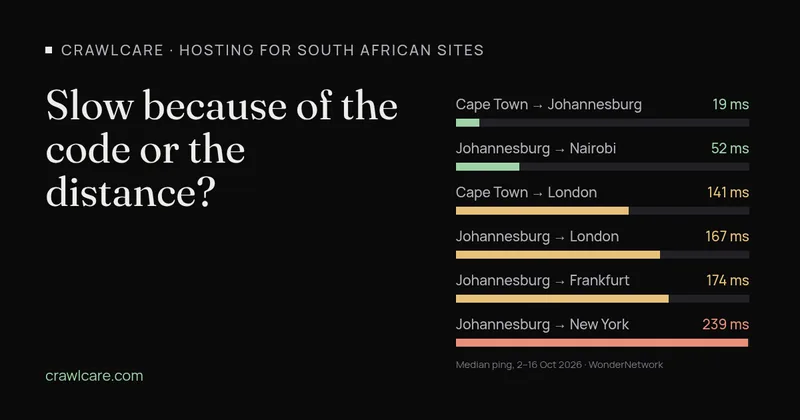
Your site feels slow, your developer blames the host, and the host blames the plugins. Before anyone gets paid to fix the wrong thing, it helps to know which kind of slow you have. One kind is the code: the server takes too long to build the page. The other is distance: the page is ready quickly, but every request has to travel to a server on another continent and back.
For South African sites this matters more than usual, because plenty of them are still hosted in Europe or the US. Here's how to tell the two apart, with real numbers.
How far is far? Real ping times from South Africa
WonderNetwork runs 30 pings between major cities every hour and publishes the results. These are the median round-trip times over the two weeks from 2 to 16 October 2026:
- Cape Town to Johannesburg: about 19 ms (hourly averages mostly between 17.6 and 22 ms)
- Johannesburg to Nairobi: about 52 ms
- Cape Town to London: about 141 ms
- Johannesburg to London: about 167 ms
- Johannesburg to Amsterdam: about 167 ms
- Johannesburg to Frankfurt: about 174 ms
- Cape Town to New York: about 208 ms
- Johannesburg to New York: about 239 ms
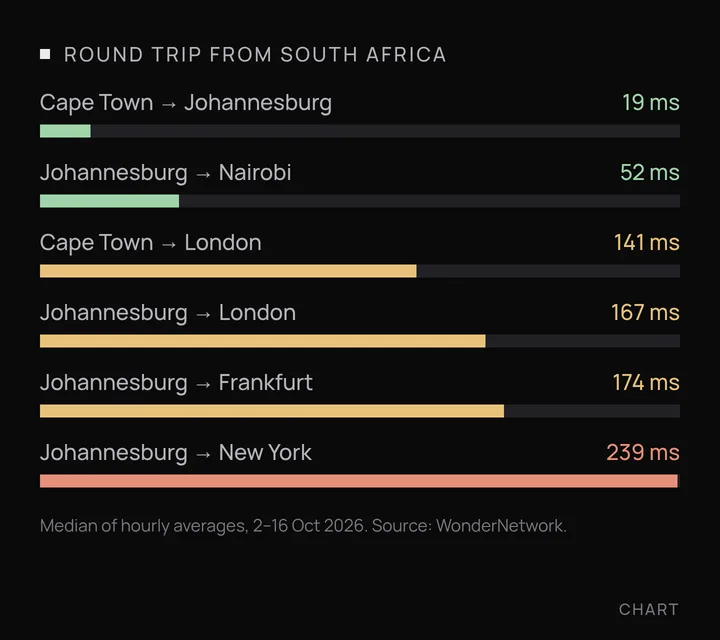
One round trip to Europe looks harmless at 0.17 seconds. The catch is that a first visit needs several of them before any content arrives: one to open the connection, at least one more to set up HTTPS, and one for the request itself. Three round trips to Johannesburg cost under 0.1 seconds. Three to London cost about half a second, and that's before the server has done any work.
What TTFB tells you
Time to First Byte (TTFB) is the time from asking for a page to receiving the first byte of it. Google's web.dev guide to TTFB counts everything from redirects and the DNS lookup up to the first byte of the response arriving. It suggests most sites aim for 0.8 seconds or less. It isn't a Core Web Vitals metric, but a slow TTFB pushes back everything after it, including Largest Contentful Paint.
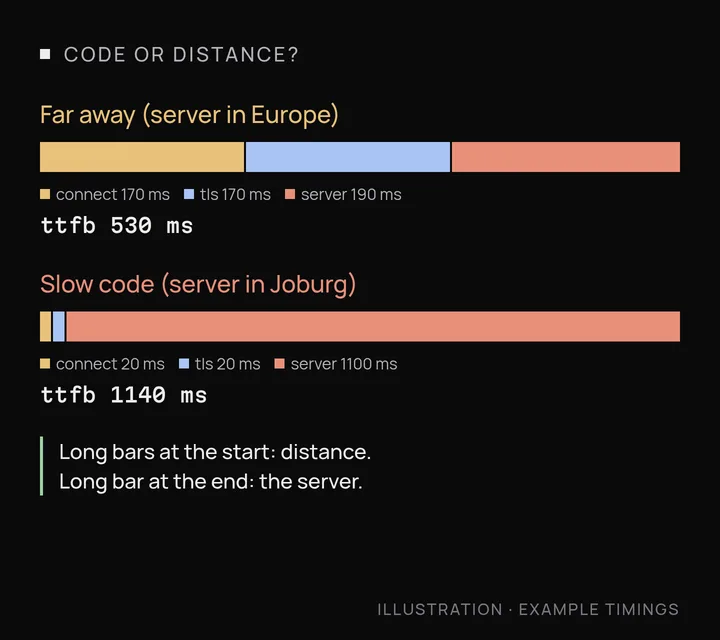
Distance shows up in the connection part. Slow code shows up in the wait after the request is sent. You need to split the two.
How to tell code from distance
1. Measure TTFB from where your customers are
If you have a terminal (Mac, Linux, or Windows with curl), run this from a South African connection, using your own address:
curl -o /dev/null -s -w "connect %{time_connect}s tls %{time_appconnect}s ttfb %{time_starttransfer}s\n" https://yourdomain.co.za/
Run it three or four times and ignore the first result, which includes the DNS lookup. No terminal? The Network tab in Chrome's DevTools shows the same phases when you click on the page request and open Timing.
2. Split the connection time from the server time
The connect figure is roughly one round trip to the server. If it's around 0.15 to 0.25 seconds from South Africa, your server (or the part of it you're reaching) is probably in Europe or the US. Now subtract tls from ttfb. What's left is one more round trip plus the time the server spent building the page. If that gap is large and the connect time is small, the problem is the code or the server, not the distance.
3. Compare a nearby and a far test location
Run the same test from a location close to your server and from one far away. WebPageTest, which web.dev lists as a lab tool for TTFB, lets you pick a test location. If TTFB is fast near the server and slow from South Africa, distance is your problem. If it's slow from everywhere, it's the code or the server.
4. Compare a cached and an uncached request
Load the page twice, then once more with a made-up query string on the end, like ?nocache=123. Many page caches skip URLs they haven't seen before, so that request is often built from scratch. A cached page that comes back quickly and an uncached one that takes a second or more points to slow code, too many plugins or a struggling database. Our guide to why websites are slow covers those fixes.
Rather not run commands? The free CrawlCare scan runs Lighthouse on your page and reports server response time alongside the rest of your speed and SEO results.
Hosting with data centres in or near South Africa
If most of your visitors are in South Africa, hosting here removes most of the distance. If they're mostly in the UK or Europe, the same logic says host there. These options have South African data centres, checked on 16 October 2026:
- Local hosts. Many South African hosts run their own servers here. For example, xneelo houses servers in Samrand (Gauteng) and Cape Town. Ask any local host which data centre your site would sit in.
- Managed WordPress on Google Cloud. Kinsta lists Johannesburg (af-johannesburg-1) among its data centres, running on Google Cloud. You choose the location when you add a site.
- Google Cloud. The
africa-south1region is in Johannesburg. - Amazon Web Services. The Africa (Cape Town) region, af-south-1, has to be switched on in your account before you can use it.
- Microsoft Azure. South Africa North is in Johannesburg and South Africa West is in Cape Town.
- A CDN in front of your current host. Cloudflare's network includes Johannesburg, Cape Town and Durban. A CDN serves cached files and pages from nearby, but anything it can't cache still travels to your server, so it helps most when your pages are cacheable.
Moving host fixes distance. It doesn't fix a page that takes two seconds to build. That's why it pays to measure first.
Quick summary
- Run the curl test from South Africa a few times.
- Slow connect time (0.15 s or more) means the server is far away.
- Fast connect time but a long wait for the first byte means slow code or a slow server.
- Slow only on uncached requests means caching is hiding a slow build.
- Pick a host near your customers, then fix the code that's left.
Want a second opinion? Run the free scan, or see our Speed Fix if you'd like us to sort it out.