Core Web Vitals assessment failed: what it means and how to pass
Published 22 Oct 2026
You ran your page through PageSpeed Insights, the performance score is a lovely green 96, and right above it Google says "Core Web Vitals Assessment: Failed". Both can be true at once, because they measure different things.
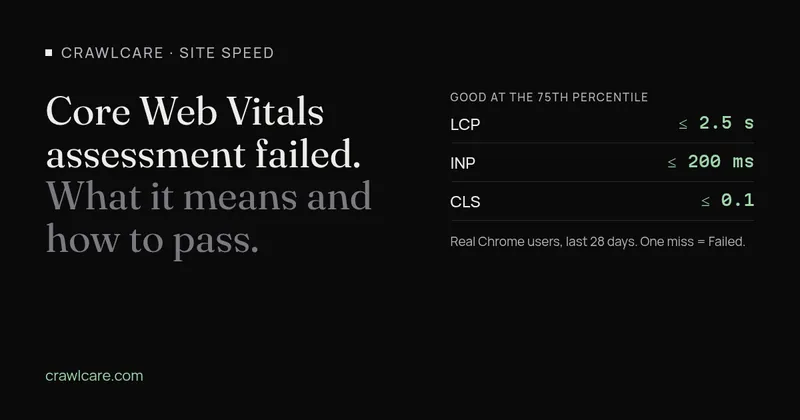
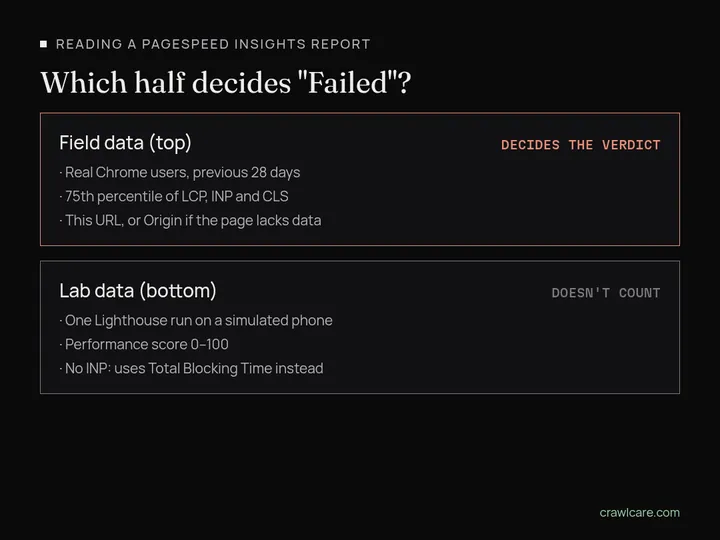
What "Failed" means: the assessment uses field data, collected from real Chrome users over the previous 28 days. Google looks at the 75th percentile of those visits for LCP, INP and CLS. If any one of them misses the "good" mark (LCP 2.5 s or less, INP 200 ms or less, CLS 0.1 or less), the assessment fails. The big score underneath is a separate lab test, and it doesn't count towards the verdict.
Why a high lab score can still fail
The lab score comes from Lighthouse loading your page once, on a simulated mid-range phone on a mobile network, from a Google data centre. Field data is every eligible Chrome visit over 28 days: old phones, patchy signal, people scrolling and tapping before the page has settled. Google's own PSI docs put it plainly: a good lab score doesn't mean real visitors are having a good time.
The usual reasons the two disagree:
- Your visitors' phones are slower than the test phone. Lab conditions are fixed. Real ones aren't, and the 75th percentile means the slowest quarter of visits sets your number.
- INP only exists in the field. Lighthouse doesn't tap anything, so it can't measure INP. It reports Total Blocking Time as a stand-in. A page can have a great TBT and still feel sluggish when someone opens a menu or a cookie banner.
- Layout shifts happen after load. The lab only sees shifts while the page loads. Real CLS counts the whole visit, so an image without dimensions halfway down the page, or an ad that pops in as you scroll, only shows up in the field.
- The lab run is a snapshot. Fix something today and the lab score changes on the next run. The field data still holds four weeks of the old site.
It can go the other way too. Repeat visitors with a warm cache, or back-button visits restored instantly, can make field numbers better than the lab run.
"This URL", "Origin" and "No data"
At the top of the field data section, PageSpeed Insights lets you switch between This URL and Origin.
- This URL is data for that one page. It only appears if the page has had enough real Chrome visits to make the Chrome User Experience Report (CrUX).
- Origin is every page on your site lumped together, so
https://www.example.comas a whole. When a page doesn't have enough data of its own, PSI falls back to the origin. That's why a new or quiet page can "fail" because of your other pages. - No data means even the whole site doesn't have enough visits for CrUX. Google doesn't publish the minimum, and the bar is the same for pages and origins. The page also has to be public and indexable: a noindex tag or a non-200 response keeps it out.
No data isn't a fail. It just means there's no field verdict, and the lab score is all you've got for now. One more catch: only Chrome on desktop and Android feeds CrUX, so iPhone visitors don't count towards it at all.
Mobile and desktop are assessed separately, too. Passing on desktop and failing on mobile is common, and mobile is usually the one that matters for a small business site.
Find which metric failed, then fix that one
The verdict only needs one red metric. In the field data section, look for the metric marked in red or amber. Its number is the 75th percentile, and here's where it needs to get to:
- LCP over 2.5 s: the main image or heading arrives late. Start with the hero image size and your server response time.
- INP over 200 ms: the page is slow to react to taps. Look at heavy JavaScript, chat widgets, sliders and anything that runs when someone clicks.
- CLS over 0.1: things jump around. Check images and embeds without width and height, late fonts and banners that push content down.
Poor starts above 4 s for LCP, 500 ms for INP and 0.25 for CLS, so if you're between the two marks you're closer than it looks. There's one wrinkle: if CrUX doesn't have enough INP data, the page can pass on LCP and CLS alone. Our guide to fixing Core Web Vitals goes through the fixes for each metric step by step, so there's no point repeating them here.
How long until it says "Passed"?
Field data in PSI covers a rolling 28 days and updates daily. After a fix, each new day of faster visits pushes out a day of old ones, so expect the numbers to drift down over a few weeks, not flip overnight. A page with little traffic may move in jumps, or bounce between page data and origin data.
To check progress:
- PageSpeed Insights: rerun it every few days and watch the 75th percentile figure for the metric you fixed.
- Search Console: open the Core Web Vitals report, find the issue and click Validate fix. That starts a 28-day monitoring window. It doesn't speed anything up or trigger a recrawl, but it tells you when Google sees the issue as fixed.
Search Console groups similar pages together, so its numbers won't always match PSI's for a single URL. Both use the same CrUX data underneath.
On WordPress?
On WordPress the usual causes are a short list, and none of them means a particular plugin is bad:
- a heavy theme or page builder that loads a lot of CSS and JavaScript on every page
- a hero image uploaded straight from a camera or stock site, much bigger than it's shown
- lots of plugins each adding their own scripts and styles, even on pages that don't use them
- no page caching, so the server builds every page from scratch
Sort those out and LCP and INP usually follow. CLS tends to be a few images or embeds missing their dimensions.
Where our free scan fits
Our free scan runs a lab test, the same kind as the bottom half of PageSpeed Insights, and points at the likely causes: big images, slow server response, render-blocking files. It can't show your field verdict, because only Google has your real-user data. Think of it as the "why" next to Google's "what". If you'd rather hand it over, our speed fix covers the lot, with fixed prices on the pricing page.
Wondering why the site's slow in the first place? Why is my website slow? covers the common causes.
Quick answers
Why does PageSpeed Insights say failed when my score is green?
The score is a single lab test on a simulated phone. The assessment uses field data from real Chrome users over the last 28 days, judged at the 75th percentile. A page can do well in the lab and still miss a threshold for real visitors.
What does "No data" mean in the Core Web Vitals assessment?
Your page, and your site as a whole, haven't had enough real Chrome visits to be included in the Chrome User Experience Report. It isn't a fail. There's just no field verdict yet, so use the lab results.
How long does it take to pass after a fix?
Field data covers a rolling 28 days, so the numbers improve gradually over about four weeks as old visits drop out. In Search Console, Validate fix starts a 28-day monitoring window.
Sources
- Google for Developers: About PageSpeed Insights (checked 22 Oct 2026)
- web.dev: Web Vitals (checked 22 Oct 2026)
- web.dev: Why lab and field data can be different (checked 22 Oct 2026)
- Chrome for Developers: CrUX methodology (checked 22 Oct 2026)
- Search Console Help: Core Web Vitals report (checked 22 Oct 2026)
Further reading
- LiteSpeed Cache 7.9.2: check for CVE-2026-113499 and friends
- Is my PHP version end of life? How to upgrade WordPress
- PHP2Shell: what PHP's emergency release means for your site
- UpdraftCentral hack: is your WordPress site affected?
- Rank Math PRO 3.0.123, Backuply and Everest Backup: is your site affected?
- AIOSEO and Bricksforge security updates: is your site affected?
- Why is my website slow?
- How to fix Core Web Vitals
- Why isn't my site showing on Google?
- How to check your website SEO for free: a 10-minute checklist
- Is your site slow because of the code or the distance? Hosting for South African sites
- Is my WordPress site hacked? A step-by-step check