Rank Math PRO 3.0.123, Backuply and Everest Backup: is your site affected?
Published 18 Oct 2026
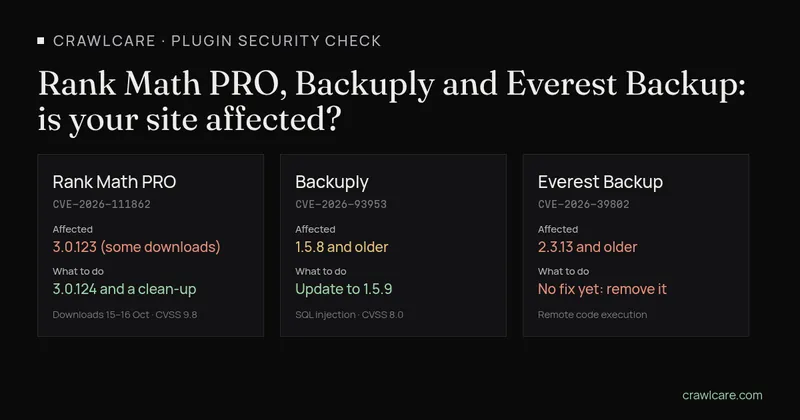
Three WordPress plugin security problems landed in the space of a fortnight, and two of them are in backup plugins, which is a bit rich. The Rank Math PRO one is different from the usual "update your plugin" story: some copies of version 3.0.123 shipped with malware inside. Here's what happened, how to tell if it touches you, and what to do about it. Times are in UTC with South African time (SAST, UTC+2) next to them.
Short version:
- Rank Math PRO: if you downloaded or updated to 3.0.123 between 15 October 20:02 UTC and 16 October 07:12 UTC (22:02 on the 15th to 09:12 on the 16th, SAST) and activated it, Rank Math says to treat the site as compromised. Updating to 3.0.124 on its own won't clean it.
- Backuply 1.5.8 or older: update to 1.5.9.
- Everest Backup 2.3.13 or older: there's no fixed version yet. We'd deactivate it and remove it until there is.
Quick check first? Our instant plugin check shows which plugin versions your site gives away, and whether any match a known issue. No email needed.
None of the three in your Plugins list? You're not affected by these. Go and have a coffee.
Rank Math PRO 3.0.123: some downloads contained malware
Rank Math published a security notice on 16 October 2026 at 20:32 UTC (22:32 SAST) and updated it on 17 October at 07:47 UTC (09:47 SAST). It says a limited number of users who downloaded Rank Math PRO 3.0.123 between 15 October 20:02 UTC and 16 October 07:12 UTC got plugin files that "contained malware that could compromise your website if the plugin was activated". Rank Math removed those files and released a clean version, 3.0.124.
Wordfence followed with a PSA on 17 October at 03:41 UTC (05:41 SAST). It rates the issue CVSS 9.8 (critical) under CVE-2026-111862. When we checked on 18 October, that CVE number was still marked reserved at cve.org, so there's no public CVE record to read yet.
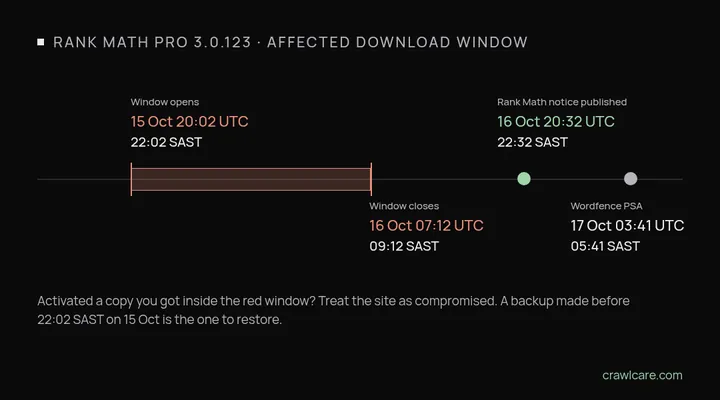
One thing worth knowing before you panic: having 3.0.123 installed doesn't prove anything by itself. Wordfence says so plainly. What matters is when you got that copy and whether you switched it on. Both notices are about Rank Math PRO only. Neither one mentions the free Rank Math SEO plugin.
Which case are you?
Go to Plugins in wp-admin and check your Rank Math PRO version. Then find your case below. These come from Rank Math's notice.
I installed and activated 3.0.123 during the window
Treat the site as compromised and follow the recovery steps below.
I installed 3.0.123 but never activated it
Delete the plugin files, install the clean 3.0.124 from your Rank Math account and run a security scan to be safe.
I downloaded 3.0.123 but never installed it
Rank Math says there's no sign from this incident alone that your site was compromised. Not sure whether that copy ever got installed or switched on? Ask Rank Math's support team.
Rank Math emailed me about it
Wordfence says Rank Math has records of who downloaded an affected copy. If you got an email from them, follow their recovery steps even if you're on a different version now.
A note on those emails: Rank Math says it will never send login or download links by email. Go to rankmath.com yourself and log in there. Treat any "reset your password" or "download the fix" link in your inbox as suspicious.
If you activated an affected copy
Option 1: restore a clean backup. This is Rank Math's recommended route. You need a backup made before 15 October at 20:02 UTC, which is 22:02 SAST. Restore the files and the database, run a security scan (Rank Math names Wordfence and Sucuri as examples), change every password and key the site could reach, then install 3.0.124 from your Rank Math account.
Option 2: clean it by hand. Rank Math's notice says the malware can rebuild its hidden backdoor whenever someone visits the site, so the order matters. First, all three of these:
- Delete the whole
rank-math-proplugin folder with your host's file manager or FTP. Deactivating it isn't enough. - In the
wp_optionstable (phpMyAdmin will do), delete any row whoseoption_nameis_uf6qdn2hmm,t8krdk990phbor_np5pvf754c. - If your host or firewall can do it, block outgoing connections to
rank1cdn[.]com.
Only then go looking for the rest. If you're not comfortable poking around in files, the database and server settings, Rank Math itself says to get your host or a security professional to do it.
Signs to look for (indicators of compromise)
This list comes from Rank Math's notice, and Wordfence repeats it. Finding any of these needs looking into. Finding none of them doesn't prove the site is clean.
- Network: outgoing connections to
rank1cdn[.]com. - Database:
wp_optionsrows named_uf6qdn2hmm,t8krdk990phbor_np5pvf754c. - Users: admin accounts you don't recognise, especially usernames starting with
wpsupport_or email addresses ending in@wp-mail[.]net.wp user list --role=administratorlists them if you have WP-CLI. - A fake core file:
wp-includes/class-wp-cache-util.phpisn't a real WordPress file. Remove it, then runwp core verify-checksumsand reinstall core from an official source. - Hidden PHP files in
wp-content/mu-plugins/, in other plugins' folders, in theinc/,includes/andlib/folders of non-default themes, and in Rank Math'sincludes/folder. Look forbase64_decodecombined with XOR loops, the keyxmmqhn,proc_openor PHP-FPM socket code. - .htaccess and .cache files: rules that let
.cachefiles run as PHP, and.cachefiles with PHP code in them. - Scheduled tasks: crontab entries for the web server user tagged
#ms6v46. Check WordPress events too withwp cron event list. - Uploads: PHP files in the uploads folder, which shouldn't have any.
- The server itself: SSH
authorized_keysfiles, other users' crontabs, running processes and anywhere outside the site folder the web server can write to. On shared hosting, ask your host to check these.
Change every password and key, even after a restore
Rank Math says to assume anything the site could read has leaked. That means WordPress passwords, the database username and password in wp-config.php, the WordPress security keys and salts, payment gateway and SMTP credentials, any API keys stored in settings, your hosting panel, FTP, SFTP and SSH logins, and two-factor settings on admin accounts. Yes, all of them. It's tedious, and it's the step people skip.
Check it stayed clean
Run a full security scan, then wp core verify-checksums and wp plugin verify-checksums --all. Premium plugins often don't have checksums, so compare those with a fresh copy from the developer. Keep an eye on outgoing connections for a few days. If a file you deleted comes back, the clean-up isn't finished.
Backuply 1.5.8 and older: update to 1.5.9
Wordfence wrote this one up on 15 October 2026. Backuply has more than 600,000 active installs. The flaw is CVE-2026-93953, CVSS 8.0 (high), and it affects every version up to and including 1.5.8.
How it works, roughly: anyone with an account on your site, even a subscriber, can hide SQL in the Biographical Info field of their own profile. Nothing happens until an admin restores a database backup made after that. During the restore the hidden SQL runs, and it can switch on open registration and make administrator the default role for new accounts. The attacker then signs up and gets an admin account. It needs an account on your site to start with, so it matters most on sites where strangers can register.
- Fix: Backuply 1.5.9, released 1 October 2026. It's on WordPress.org, so it's a normal update from Plugins.
- Firewall: Wordfence Premium, Care and Response users got a firewall rule on 24 September. Free Wordfence users get it on 24 October.
- Worth a look after any restore: under Settings > General, check "Anyone can register" and "New User Default Role". If they've changed and you didn't change them, that's your cue to look further.
Everest Backup 2.3.13 and older: no fix yet
This one is smaller (about 3,000 active installs on WordPress.org) but nastier. CVE-2026-39802 is an unauthenticated remote code execution flaw, which means someone who isn't logged in can run code on your server. It affects versions up to and including 2.3.13.
- Patchstack published it on 6 October 2026, with "No official patch available". It scores it 8.1. The CVE record, published by Patchstack on 10 October, gives the same 8.1.
- Wordfence's weekly report for 5 to 11 October lists it as unpatched and rates it 9.8 (critical).
- When we checked on 18 October, the latest version on WordPress.org was still 2.3.13, last updated on 20 August 2026.
What we'd do: download any backups you want to keep, deactivate the plugin and delete it. Then set up a different backup plugin, and keep copies somewhere other than the same server. That's our advice, not the vendor's: the sources say there's no fix, and they don't give a workaround. If a patched version appears, we'll update this post.
Can the free scan tell me?
Partly, and here's exactly how much. The free CrawlCare scan reads your public page, the same HTML a visitor's browser gets. It now flags:
- Rank Math PRO files marked version 3.0.123, Backuply files marked 1.5.8 or older, and Everest Backup files marked 2.3.13 or older;
- anything on the page that loads from
rank1cdn[.]com, which counts as a possible sign of compromise on its own.
The catch: backup plugins mostly work inside wp-admin and often don't load any files on your public pages, and plenty of plugins don't show a version at all. The Rank Math malware's connection to rank1cdn comes from the server, which no outside scan can see. So if the scan flags nothing, it means we didn't spot anything. It doesn't mean you're clean. Check Plugins in wp-admin for the real answer, then run the scan for everything else it checks: speed, SEO basics, HTTPS, email records and the tech it can identify.
Think you've been hit?
If you activated an affected Rank Math PRO copy, or something from the list above turned up, and you'd rather not do database surgery yourself, that's what our Hack Rescue is for. We remove the malware, restore a clean copy and harden the site so it's harder to break in again. The price is on our pricing page, and there's more on our services page. Not sure yet? Our guide to spotting a hacked WordPress site walks through the checks.
Related: PHP2Shell: what PHP's emergency release means for your site. Sites below PHP 8.2 don't get the fix.
Not sure what your site runs? Paste your address into the WordPress plugin check and you'll see the visible plugin versions in a few seconds.
Quick answers
Is the free Rank Math SEO plugin affected?
Neither Rank Math's notice nor the Wordfence PSA says so. Both cover Rank Math PRO 3.0.123 only.
Does updating to Rank Math PRO 3.0.124 fix it?
Not on its own. It replaces the bad plugin files, but Wordfence points out it doesn't remove files, accounts or scheduled tasks the malware may already have created. If you activated an affected copy, restore a clean backup or clean the site by hand first.
Is there a fix for Everest Backup?
Not as of 18 October 2026. Wordfence and Patchstack both list it as unpatched, and 2.3.13 is still the latest version on WordPress.org.
Sources
- Rank Math: PRO 3.0.123 security incident (published 16 Oct 2026 20:32 UTC, updated 17 Oct 2026 07:47 UTC)
- Wordfence PSA: Malware found in some Rank Math SEO PRO 3.0.123 downloads (17 Oct 2026; CVE-2026-111862, CVSS 9.8). The CVE-2026-111862 entry was still reserved on 18 Oct 2026.
- Wordfence: SQL injection in Backuply (15 Oct 2026) and the CVE-2026-93953 record (published by Wordfence, 16 Oct 2026, CVSS 8.0)
- CVE-2026-39802 record (published by Patchstack, 10 Oct 2026, CVSS 8.1) and the Patchstack entry (6 Oct 2026, no official patch)
- Wordfence weekly vulnerability report, 5 to 11 Oct 2026 (published 15 Oct 2026; Everest Backup listed as unpatched, CVSS 9.8)
- Everest Backup and Backuply on WordPress.org (versions 2.3.13 and 1.5.9, checked 18 Oct 2026)
Further reading
- LiteSpeed Cache 7.9.2: check for CVE-2026-113499 and friends
- Is my PHP version end of life? How to upgrade WordPress
- PHP2Shell: what PHP's emergency release means for your site
- Core Web Vitals assessment failed: what it means and how to pass
- UpdraftCentral hack: is your WordPress site affected?
- AIOSEO and Bricksforge security updates: is your site affected?
- Why is my website slow?
- How to fix Core Web Vitals
- Why isn't my site showing on Google?
- How to check your website SEO for free: a 10-minute checklist
- Is your site slow because of the code or the distance? Hosting for South African sites
- Is my WordPress site hacked? A step-by-step check