UpdraftCentral hack: is your WordPress site affected?
Published 20 Oct 2026
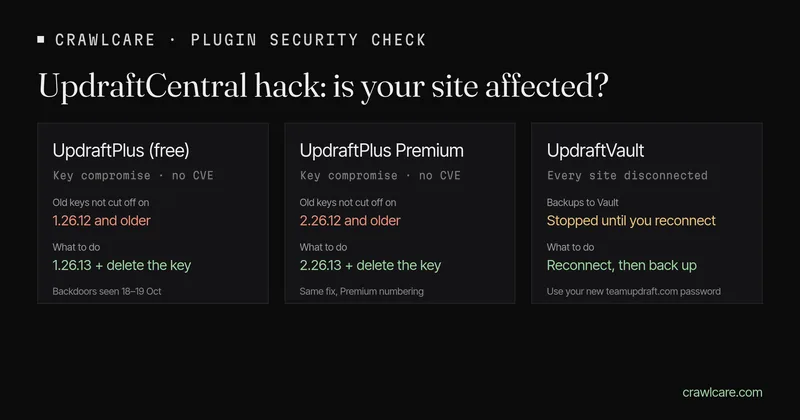
UpdraftPlus is the backup plugin on more than 4 million WordPress sites, so when its maker gets broken into, a lot of people need to pay attention. Over the weekend of 17 and 18 October 2026, someone got into teamupdraft.com and walked off with the keys that let the UpdraftCentral dashboard send commands to connected sites. Patchstack then watched those keys being used to install backdoor plugins. Here's what happened, how to check your site in a few minutes, and what to do. Times are in UTC with South African time (SAST, UTC+2) next to them.
Short version:
- Update UpdraftPlus to 1.26.13 (free) or 2.26.13 (Premium). Anything up to and including 1.26.12 (2.26.12 on Premium) is still at risk: 1.26.12 was meant to cut off the stolen keys, but only 1.26.13 actually does it.
- Delete your UpdraftCentral key under Advanced Tools, even if you've never knowingly used UpdraftCentral. Your backups keep running without it.
- Look for an Editor account and plugins you don't recognise. The backdoor hides its account as an Editor, not an admin.
- Use UpdraftVault? Reconnect it. Every site was disconnected, so your backups aren't reaching Vault until you do.
- Got a teamupdraft.com account? Change that password and reset two-factor.
Quick check first? Our instant plugin check shows which plugin versions your site gives away, and whether any match a known issue. No email needed.
No UpdraftPlus in your Plugins list and no teamupdraft.com account? This one isn't about you. Carry on.
What happened
TeamUpdraft, the company behind UpdraftPlus, published a security notice on 19 October 2026 and last updated it on 20 October at 16:25 BST (15:25 UTC, 17:25 SAST). It says there was unauthorised access to teamupdraft.com over the weekend of 17 and 18 October, and that it believes the customer database was accessed. That database holds:
- names, email addresses, billing addresses and order history;
- account passwords, stored hashed rather than in plain text;
- two-factor authentication settings;
- connection keys for UpdraftCentral, UpdraftVault and UpdraftClone.
No card details were stored; Stripe and PayPal handle the cards. TeamUpdraft also says the UpdraftPlus plugin and its downloads weren't touched, backups sent to your own storage (Google Drive, Dropbox, Amazon S3 and so on) weren't touched, and self-hosted UpdraftCentral isn't affected. The problem is UpdraftCentral Cloud, the hosted dashboard.
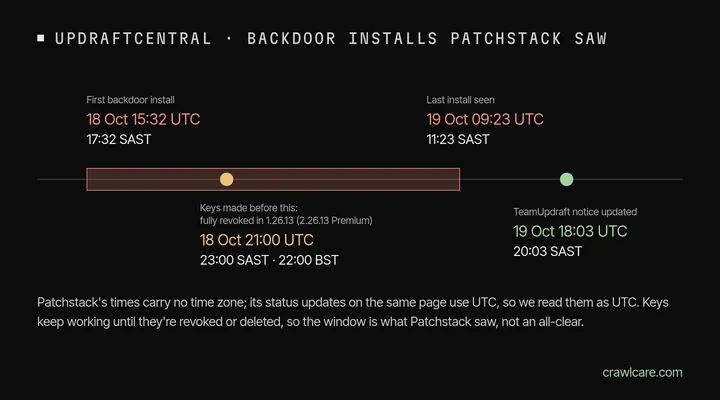
Its response so far: it signed out every account, released UpdraftPlus 1.26.12 (free) and 2.26.12 (Premium) to disconnect every UpdraftCentral connection made before 22:00 BST on 18 October (21:00 UTC, 23:00 SAST), then shipped 1.26.13 and 2.26.13 that same evening because the first try didn't apply the cut-off properly. It also disconnected every site from UpdraftVault with new credentials, replaced every UpdraftClone key and reported the incident to the UK's Information Commissioner's Office.
What the attacker did with the keys
This part comes from Patchstack's write-up of 19 October. A site with an UpdraftCentral key runs any command signed with the dashboard's key, and nobody approves each command. The attacker used real keys to send an "upload plugin" command, and WordPress installed and switched on whatever it was sent. Because the commands were properly signed, Patchstack says this isn't a bug in the plugin and there's no CVE for it.
Patchstack's telemetry recorded backdoor installs between 18 October 15:32 and 19 October 09:23. It doesn't give a time zone for those two times, but the status updates on the same page are in UTC, so we read them as UTC: that's 17:32 on the 18th to 11:23 on the 19th, SAST. Don't treat the window as an all-clear for other times, though. A key works until it's revoked or deleted.
What the backdoor does, per Patchstack:
- It arrives as a plugin under one of 99 names seen so far. "Site Health Cache" turns up again and again; the rest are random two or three word combos. Every copy has the same description: "Small maintenance toolkit: keeps option storage tidy."
- It creates an account that shows as an Editor, then quietly gives it the
manage_optionsandinstall_pluginspowers. If you only check your administrator list, you'll miss it. - It logs in by setting a cookie, so two-factor, login limits and login protection plugins never get a say.
- The account stays behind after the plugin is removed.
- The samples so far have a bug that makes affected sites return HTTP 500 errors on every uncached page. That's how the first victims noticed. If a plugin like this is crashing your site, don't fix it: fixing the error switches the backdoor on. Remove it.
Never used UpdraftCentral? Check anyway
Patchstack found that connecting your teamupdraft.com account inside UpdraftPlus shows a checkbox, "Add this website to UpdraftCentral", that comes ticked by default. Leave it ticked and the site gets an UpdraftCentral key. So plenty of people who only ever used UpdraftPlus for backups have a key they didn't know about. Keys don't expire either: Patchstack saw keys from November 2025 still working in October 2026.
How to check your site
- Check your version. Go to Plugins in wp-admin. Free versions start with 1, Premium with 2. You want 1.26.13 or 2.26.13, or newer. 1.26.12 and anything older is still at risk.
- Check for a key. With WP-CLI, run
wp option get updraft_central_localkeys. Patchstack says any output means the site has a key. Without WP-CLI, go to Settings > UpdraftPlus Backups > Advanced Tools > UpdraftCentral and look under "Manage existing keys". - Delete the key. Delete every key in that list, or run
wp option delete updraft_central_localkeys. Removing the site from the UpdraftCentral dashboard isn't enough, because the key that matters lives on your site. Backups keep working; you only lose remote management. - Check your users. Go to Users and look at Editors as well as admins. Anything you didn't create needs a closer look.
- Check your plugins, including the Must-Use tab if you can see it. Anything you don't recognise, especially "Site Health Cache", is a red flag.
- Change the admin passwords on the site.
TeamUpdraft's list for UpdraftCentral Cloud users covers the same ground: log in to each site directly rather than through UpdraftCentral, update, delete the key, check users and plugins, change admin passwords and restore a backup from before 17 October if anything looks off. Its last step is to reconnect to UpdraftCentral. Patchstack's advice is not to reconnect until the vendor explains the cause, and if you do need remote management, to create the key under an account that can't install plugins. If you don't use remote management, there's nothing to reconnect.
Which case are you?
No key, nothing odd in Users or Plugins
Update UpdraftPlus and change your teamupdraft.com password if you have an account. That's it.
There was a key, but no strange accounts or plugins
Delete the key, update, change the admin passwords and keep an eye on the site for a few days. Patchstack notes that some installs never switched on, and a site that received the backdoor still counts as affected, so check the plugins list properly.
I found the backdoor plugin or the account
Treat the site as compromised and follow the clean-up steps below.
Signs to look for (indicators of compromise)
All from Patchstack. Finding one of these needs looking into. Finding none doesn't prove the site is clean, and the next wave will use new names.
- Plugin files containing the line "Small maintenance toolkit: keeps option storage tidy." On the server:
grep -rl "Small maintenance toolkit: keeps option storage tidy\." wp-content/plugins/ - Accounts with the Editor role plus
manage_options. Usernames seen so far follow a two words plus two digits pattern, likedata-ops43andmedia-staff96, with an email at@example.organd the display name "Site Tools". - Database: an option whose name ends in
_sync_token. - Logs: requests from
43.250.53.42or2a09:bac5:4e21:2e3c::49b:9. Patchstack says the attacker rotated servers within a day, so blocking IPs won't do much. In the UpdraftCentral log, look for "Command received: plugin.upload_plugin". - The trigger: a request with a short secret URL parameter carrying a 32-character token. Patchstack says a hit on that means the backdoor was used, not just installed.
- Plugin installs nobody on your team did, and WordPress error emails naming a plugin you don't recognise.
If you find the backdoor
- Delete the UpdraftCentral key first. Otherwise, Patchstack says, the attacker can push a fixed replacement.
- Deactivate the plugin and move its folder out of the site with your host's file manager or FTP. Don't delete it from wp-admin: its uninstall routine wipes its own traces.
- Remove the account and the
_sync_tokenoption. - If the account was there, or the trigger shows up in your logs, Patchstack says to treat the site as fully compromised: restore a backup from before the attack, compare files against clean copies, review every user with extra powers, change admin and UpdraftCentral Cloud passwords, log everyone out and turn on two-factor.
Not comfortable doing this in files and the database? That's a fair call, and it's what the help below is for.
Which version fixes it: 1.26.12 or 1.26.13?
1.26.13. TeamUpdraft's 20 October update names 1.26.13 (free) and 2.26.13 (Premium), though the step-by-step list further down its notice still says 1.26.12. The UpdraftPlus changelog on WordPress.org tells the rest. 1.26.12, released 19 October, "revokes UpdraftCentral Cloud keys created before the incident". 1.26.13, released the same day, says "Properly apply the revocation in 1.26.12". So every version up to and including 1.26.12 is at risk, and 1.26.13 is the fix. The changelog says Premium versions are one higher in the first digit, so on Premium it's up to and including 2.26.12 at risk, fixed in 2.26.13.
Updating cuts off old keys. It doesn't remove a backdoor or account that's already there, which is why the checks above still matter. Patchstack also says deleting your keys is still the right move after the fix.
UpdraftVault users: reconnect, or your backups stay stopped
This is the one that's easy to miss, because nothing breaks where you can see it. TeamUpdraft disconnected every site from UpdraftVault, so backups won't reach Vault until you reconnect. For each site:
- Go to Settings > UpdraftPlus > Settings.
- Under remote storage, click UpdraftVault, then under "Already got space?" click Connect.
- Enter your teamupdraft.com email and your new password, then click Connect.
- Click Save Changes and run a manual backup to make sure it works.
Reset your teamupdraft.com password first: type the address in yourself rather than clicking a link in an email. TeamUpdraft says it will never ask for your password or keys. While you're there, reset two-factor too, and change the password anywhere else you used it.
Using UpdraftClone and sharing client keys with your own clients? The old keys no longer work. Copy the new ones from My Account > UpdraftClone > UpdraftClone Key Management on teamupdraft.com and send them on.
Can the free scan tell me?
Partly, and here's exactly how much. The free CrawlCare scan reads your public page, plus UpdraftPlus's public readme.txt file if your site runs WordPress. That's one ordinary request for a file any visitor can open. It flags:
- UpdraftPlus 1.26.12 or older, and Premium 2.26.12 or older, when it can see the version. The fix is 1.26.13 (or 2.26.13).
The catch: many hosts block readme files, and UpdraftPlus rarely loads anything on your public pages, so often we won't see a version at all. No outside scan can see whether your site holds an UpdraftCentral key, or spot an Editor account. So if the scan flags nothing, it means we didn't spot anything. It doesn't mean you're clean. The checks above are the real answer. Then run the scan for everything else it looks at: speed, SEO basics, HTTPS, email records and the tech it can identify.
Think you've been hit?
If you found the backdoor plugin or a mystery Editor, or your site has been throwing 500 errors since the weekend, and you'd rather not do this yourself, that's what our Hack Rescue is for. We remove the malware, restore a clean copy and harden the site so it's harder to break in again. The price is on our pricing page, and there's more on our services page. Not sure yet? Our guide to spotting a hacked WordPress site walks through the checks.
Related: LiteSpeed Cache 7.9.2 security check, and PHP2Shell: what PHP's emergency release means for your site. Sites below PHP 8.2 don't get the fix.
Not sure what your site runs? Paste your address into the WordPress plugin check and you'll see the visible plugin versions in a few seconds.
Quick answers
Is the UpdraftPlus plugin itself hacked?
No. TeamUpdraft says the plugin and its downloads weren't affected. The stolen keys were the problem, and Patchstack agrees there's no bug in the plugin code here.
Is updating to 1.26.13 enough?
It cuts off the old keys, but it won't remove a backdoor or account that's already on your site. Delete the UpdraftCentral key and check your users and plugins as well.
I only use UpdraftPlus for backups. Do I need to do anything?
Check for an UpdraftCentral key anyway. Patchstack found a checkbox that adds sites to UpdraftCentral is ticked by default, so lots of backup-only sites have one. And if you use UpdraftVault, reconnect it.
Is this the same as the UpdraftPlus bug from June?
No. That was CVE-2026-10795, fixed in 1.26.5 and 2.26.5, where commands could be forged without any key. Patchstack says attempts to use it continue, so a site still below 1.26.5 has both problems.
Sources
- TeamUpdraft: security incident, what customers need to know (posted 19 Oct 2026, last updated 20 Oct 2026 16:25 BST, 15:25 UTC)
- UpdraftPlus on WordPress.org: changelog (1.26.12 and 1.26.13, both 19 Oct 2026; 4+ million active installs; checked 21 Oct 2026)
- Patchstack: Stolen UpdraftCentral keys are backdooring WordPress sites (Dave Jong, 19 Oct 2026)
Further reading
- LiteSpeed Cache 7.9.2: check for CVE-2026-113499 and friends
- Is my PHP version end of life? How to upgrade WordPress
- PHP2Shell: what PHP's emergency release means for your site
- Core Web Vitals assessment failed: what it means and how to pass
- Rank Math PRO 3.0.123, Backuply and Everest Backup: is your site affected?
- AIOSEO and Bricksforge security updates: is your site affected?
- Why is my website slow?
- How to fix Core Web Vitals
- Why isn't my site showing on Google?
- How to check your website SEO for free: a 10-minute checklist
- Is your site slow because of the code or the distance? Hosting for South African sites
- Is my WordPress site hacked? A step-by-step check