LiteSpeed Cache 7.9.2: check for CVE-2026-113499 and friends
Published 25 Oct 2026
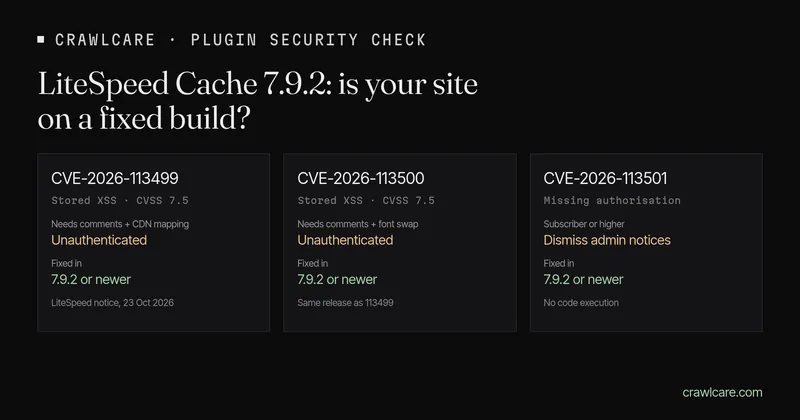
LiteSpeed Cache is the speed plugin on a huge chunk of shared hosting, especially Hostinger and South African hosts that ship LiteSpeed by default. On 23 October 2026 LiteSpeed published a security notice for three bugs fixed in version 7.9.2. Patchstack rates the stored XSS as "expected to become exploited". Here's the short version of what that means, how to see which build you're on, and what to do today.
Short version:
- Update LiteSpeed Cache to 7.9.2 or newer. Anything below that is in the range LiteSpeed patched on 19 October.
- Can't update yet? Turn on comment moderation. LiteSpeed says that lowers the risk of the two XSS bugs.
- Three CVEs, one release: CVE-2026-113499 and CVE-2026-113500 are stored cross-site scripting (CVSS 7.5). CVE-2026-113501 is a missing authorisation check that lets a Subscriber dismiss some admin notices. None of them are in CISA's Known Exploited Vulnerabilities list.
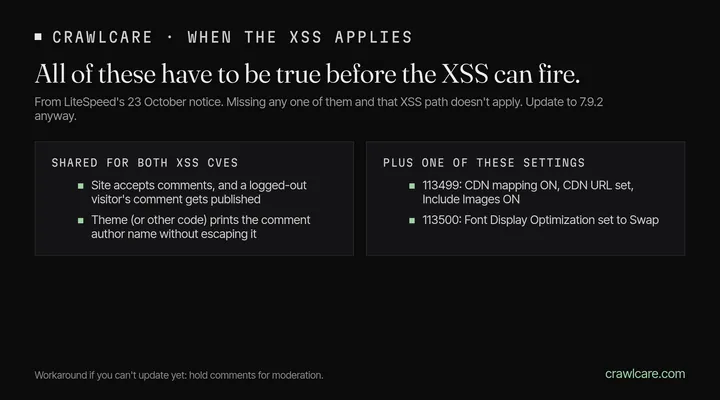
- The XSS isn't "anyone can break in". It needs a published guest comment, a theme that prints the author name unescaped, and certain CDN or font settings. Miss any of those and that path doesn't apply. Update anyway.
Quick check first? Our instant plugin check already flags LiteSpeed Cache below 7.9.2 when the public readme (or a version string on the page) is readable. No email needed.
What LiteSpeed said
LiteSpeed's 23 October notice covers three issues in LiteSpeed Cache for WordPress, all fixed in 7.9.2:
- CVE-2026-113499 — stored XSS. Needs comments from logged-out visitors to be published, the theme (or other code) to print the comment author name without escaping it, and these CDN settings on: Use CDN Mapping, a CDN URL, and Include Images.
- CVE-2026-113500 — stored XSS with the same comment and author-name conditions, plus Page Optimization → CSS Settings → Font Display Optimization set to Swap.
- CVE-2026-113501 — missing authorisation. A logged-in Subscriber (or higher) can dismiss some admin notices the plugin meant to keep pinned, including a warning that sensitive files may be publicly accessible. It does not give access to site data, and it does not let them run code or take over accounts.
Timeline from the same notice: patched and released to WordPress.org on 19 October; added to LiteSpeed's control-panel stable list on 23 October. If your host pushes plugin updates from that list, 23 October is when 7.9.2 showed up there.
What Patchstack says
Patchstack's entry (23 October) lists the unauthenticated stored XSS as high priority, CVSS 7.5, and "expected to become exploited". That phrasing means they expect mass scanning, not that your site has been hit. It is not in CISA KEV. Their advice matches LiteSpeed's: update to 7.9.2 or later.
How to see your version
- Plugins screen. In wp-admin go to Plugins and find LiteSpeed Cache. You want 7.9.2 or newer.
- Public readme. Many sites still serve
/wp-content/plugins/litespeed-cache/readme.txt. Open it in a browser and look for the Stable tag / version line. That's the same file our plugin check reads. - Instant check. Paste your address into the WordPress plugin check. If we can see the version and it's below 7.9.2, you'll get a calm "matches a known issue" line — not a claim that anyone has used it on your site.
No LiteSpeed Cache in Plugins? This one isn't about you.
What to do today
- Update to 7.9.2+ from Plugins → update, or ask your host if they manage plugin updates for you.
- If you can't update yet, turn on comment moderation (Settings → Discussion → "Comment must be manually approved"). That is LiteSpeed's own workaround for the XSS bugs. It does not cover CVE-2026-113501; the update does.
- After you update, you can leave moderation as you prefer. The fixed build is the real answer.
What the free tools can and can't see
The plugin check and the free CrawlCare scan look from outside. They read your homepage and, when it's public, the LiteSpeed Cache readme. They flag versions below 7.9.2. They cannot see whether comments are moderated, whether your theme escapes author names, or which CDN and font settings are on. A clean result means we didn't spot a match. Check Plugins in wp-admin for the full list.
Want a hand?
If you'd rather not poke at plugins yourself, see services and pricing, or email hello@crawlcare.com. Related reading: the UpdraftCentral key compromise, and our guide to spotting a hacked WordPress site if something already looks off.
Quick answers
Is LiteSpeed Cache safe to keep using?
Yes, once you're on 7.9.2 or newer. The bugs are in older builds. LiteSpeed's own notice says if you keep the plugin up to date, there's nothing else you need to do for these three CVEs.
Does a version below 7.9.2 mean my site was hacked?
No. It means you're on a build that still has the published holes. Update, and if something already looks wrong on the site, dig further — the version alone doesn't prove anyone used these bugs on you.
Do I need all three settings for the XSS to matter?
For each XSS CVE, LiteSpeed lists a specific set of conditions. Both need a published guest comment and unescaped author output. 113499 also needs the CDN mapping options; 113500 needs Font Display Optimization set to Swap. Sites with neither option enabled aren't affected by those XSS paths. CVE-2026-113501 is separate and only needs a Subscriber-level login.
Is this in CISA's KEV list?
Not as of 25 October 2026. Patchstack still expects exploitation. Treat the update as due, not optional.
What are the CVE numbers again?
CVE-2026-113499 and CVE-2026-113500 (stored XSS), and CVE-2026-113501 (missing authorisation). All fixed in LiteSpeed Cache 7.9.2.
Sources
- LiteSpeed: Security Updates for LSCWP (23 Oct 2026) — CVEs, conditions, workaround, timeline
- Patchstack: LiteSpeed Cache < 7.9.2 unauthenticated stored XSS (23 Oct 2026, CVSS 7.5, "expected to become exploited")
- CVE-2026-113499, CVE-2026-113500, CVE-2026-113501 (updated 23 Oct 2026)
Further reading
- Is my PHP version end of life? How to upgrade WordPress
- PHP2Shell: what PHP's emergency release means for your site
- Core Web Vitals assessment failed: what it means and how to pass
- UpdraftCentral hack: is your WordPress site affected?
- Rank Math PRO 3.0.123, Backuply and Everest Backup: is your site affected?
- AIOSEO and Bricksforge security updates: is your site affected?
- Why is my website slow?
- How to fix Core Web Vitals
- Why isn't my site showing on Google?
- How to check your website SEO for free: a 10-minute checklist
- Is your site slow because of the code or the distance? Hosting for South African sites
- Is my WordPress site hacked? A step-by-step check