Is my PHP version end of life? How to upgrade WordPress
Published 24 Oct 2026
If you've been hearing about PHP2Shell and wondering whether "just ask your host to patch" is enough, the answer depends on one number: your PHP version. About 71% of PHP installs still run an end-of-life branch (Qualys, reported by SecurityWeek on 23 October 2026). Those don't get official fixes from php.net. This guide shows which versions are still supported, how to check yours, and how to upgrade WordPress without breaking the shop.
Short version:
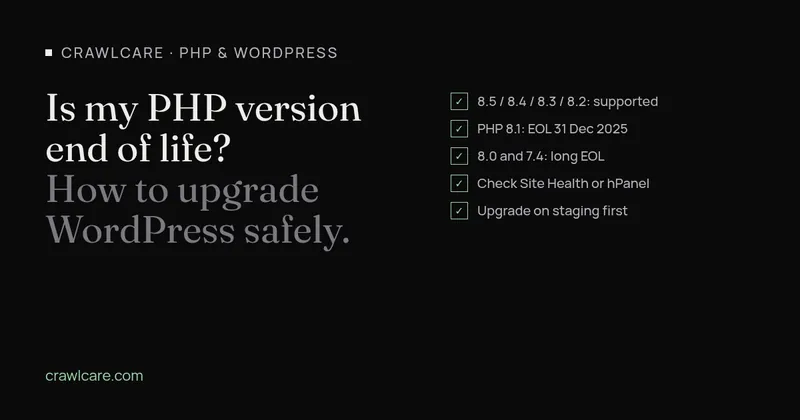
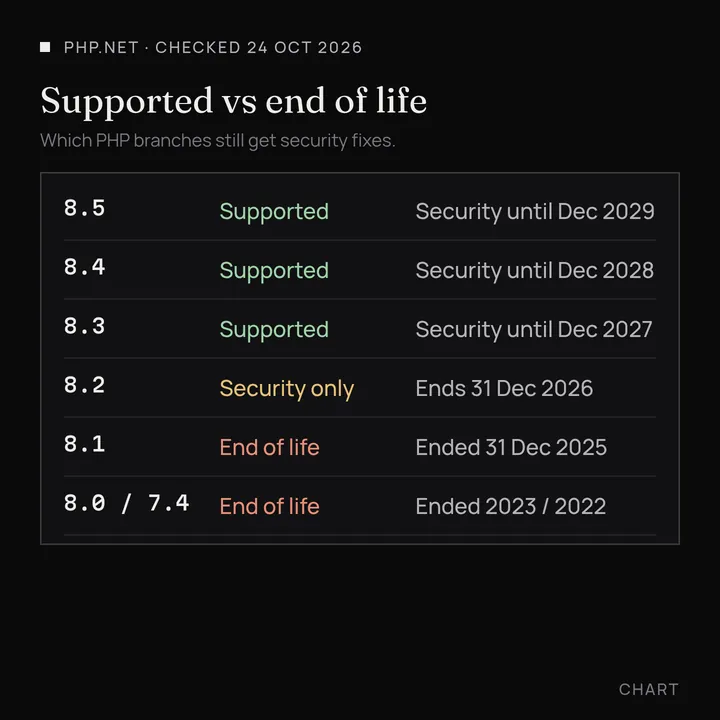
- Supported today (security fixes): PHP 8.2, 8.3, 8.4 and 8.5. Checked on php.net on 24 October 2026.
- End of life: PHP 8.1 ended on 31 December 2025. 8.0 ended 26 November 2023. 7.4 and older are long gone.
- PHP 8.2's security window closes on 31 December 2026, so plan the next move soon even if you're patched for PHP2Shell.
- On an EOL version, a host "patch" may or may not exist. Moving to a supported branch is the real fix.
- Upgrade path: back up, check plugins, switch in the host panel (or on staging first), test, keep a roll-back.
Which PHP versions are supported?
php.net supports each branch for two years of active fixes, then two more years of critical security fixes only. After that it's end of life.
As of 24 October 2026, from php.net's supported versions page:
- PHP 8.5 : active support until 31 December 2027; security until 31 December 2029
- PHP 8.4 : active support until 31 December 2026; security until 31 December 2028
- PHP 8.3 : security-only until 31 December 2027
- PHP 8.2 : security-only until 31 December 2026
Everything older, including PHP 8.1, 8.0, 7.4 and below, is end of life. php.net publishes the dates; your host's panel may still offer those versions, but that doesn't mean they get new php.net releases.
Why EOL PHP matters after PHP2Shell
PHP2Shell (CVE-2026-109618 and CVE-2026-109619) got emergency fixes on 21 October 2026 for the supported branches: 8.2.35, 8.3.36, 8.4.27 and 8.5.12. There's been plenty of scanning and exploit attempts since, including traffic tied to a Mirai botnet, but as of SecurityWeek's 23 October round-up and CISA's 23 October update there still isn't a confirmed mass compromise.
On 8.1 or older, php.net did not ship an official version bump. They published bare-bones source patches some vendors can backport, and some hosts do. That's host-by-host. CISA's advice for systems that can't patch, or that still run 8.1 or older, was to take them offline until they're patched or updated.
So the honest line is: ask your host whether your current build includes the 21 October fixes, and if you're on 8.1 or older, plan the move to a supported PHP version. Don't wait for another nickname.
How to find your PHP version
- In WordPress: go to Tools → Site Health → Info → Server. Look for "PHP version".
- In your hosting panel: hPanel, cPanel, Plesk and most SA panels have a "PHP version" or "Select PHP version" tool. Hostinger, xneelo and Afrihost all expose it under a similar name.
- From outside: our free scan reads the version your server sends in
X-Powered-Bywhen it sends one. The instant PHP2Shell check does the same, focused on the October fixes.
A recent Build Date on a PHP Info page can mean your host patched without changing the version number. That's common. When in doubt, ask them.
How to upgrade PHP in WordPress without breaking things
Jumping from 8.1 (or 7.4) to 8.3 is a bigger job than applying a point release. Themes and plugins written for ancient PHP can fatal on a newer one. Do it in this order:
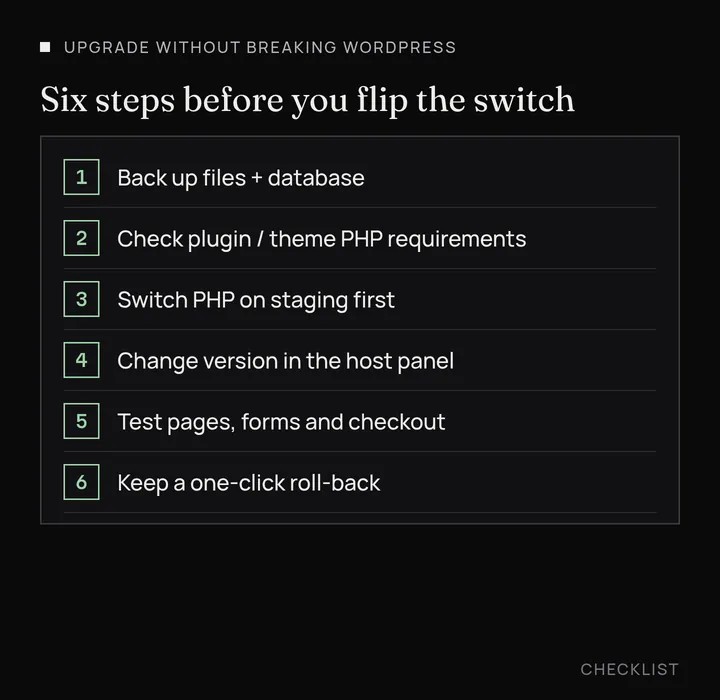
- Back up files and the database. A real restore-tested backup, not "we think Updraft ran".
- Check plugin and theme compatibility. In wp-admin, update what you can first. Read the WordPress.org page or the author's changelog for a minimum PHP version. Deactivate anything abandoned.
- Use staging if your host offers it. Clone the site, switch PHP there, click through home, shop, cart, checkout, contact forms and the wp-admin screens you use daily.
- Switch the PHP version in the host panel. Pick a supported branch (8.3 or 8.4 is a sensible default in late 2026). Save, wait a minute, then confirm Site Health shows the new number.
- Test the live site the same way. Place a test order if you take payments. Check the error log your host provides.
- Keep a roll-back: know how to switch the panel back to the old version and restore the backup if something odd shows up in the first day.
If a plugin dies on the new PHP, you either replace it or stay stuck. That's usually the real blocker, not WordPress itself. Current WordPress runs fine on the supported PHP branches.
After the patch
If the site throws 500s or blank pages right after a PHP patch, check the memory limit before you assume a hack. On 8.5.12 and 8.4.27, PHP can kill a worker with exit code 137 at the new hard memory ceiling (tracker #24492). That is a patch side effect, not proof of compromise.
On 26 October, researchers confirmed the first real PHP2Shell break-in on a honeypot (BleepingComputer; Marcus Hutchins at Expel backed the finding), and attack traffic is still rising. There is still no confirmed mass compromise of everyday sites. Keep the upgrade plan: supported PHP, staging first, then switch.
If you want us to handle the upgrade, we test on staging, keep a rollback point, work to a fixed price, and quote any extras before we touch live. See services and pricing, or email hello@crawlcare.com.
When to get help
If your site is a shop, a booking tool or anything you'd rather not poke live at midnight, get a second pair of eyes. Start with the free scan so you've got a baseline, or run the PHP2Shell check if you only care about the October fixes. From there, our existing services cover audits, single fixes and cleanup when something's already gone wrong : see services and pricing. Or email hello@crawlcare.com and we'll say honestly what we'd do next.
Quick answers
Is PHP 8.1 end of life?
Yes. php.net ended security support for PHP 8.1 on 31 December 2025. As of 24 October 2026 it no longer receives official releases.
Is PHP 8.2 end of life?
Not yet. PHP 8.2 is on security-only support until 31 December 2026. After that it joins the EOL list, so plan an upgrade this quarter if you're on it.
How do I upgrade PHP in WordPress?
You change it in the hosting panel (or ask your host), not inside WordPress. Back up first, test on staging if you can, then switch and re-check Site Health, your key pages and checkout.
Does an EOL PHP version get the PHP2Shell fix?
Not as an official php.net release. Some hosts backport the source patches. Ask yours, and treat moving to 8.2+ as the lasting fix.
What PHP version should I upgrade to?
Pick a branch that still has security support and that your theme and plugins claim to support. In late 2026, 8.3 or 8.4 is the usual sweet spot. 8.5 is fine if your stack is current.
Sources
- php.net: Supported Versions (checked 24 Oct 2026)
- php.net: Unsupported Branches (checked 24 Oct 2026)
- SecurityWeek: Mirai Botnet Operators Join PHP2Shell Attacks as ASLR Bypass Exploits Emerge (23 Oct 2026; Qualys 71% figure)
- CISA: Critical Vulnerabilities in PHP Require Immediate Patching (21 Oct 2026, updated 23 Oct)
- CrawlCare: PHP2Shell : what PHP's emergency release means for your site
Further reading
- LiteSpeed Cache 7.9.2: check for CVE-2026-113499 and friends
- PHP2Shell: what PHP's emergency release means for your site
- Core Web Vitals assessment failed: what it means and how to pass
- UpdraftCentral hack: is your WordPress site affected?
- Rank Math PRO 3.0.123, Backuply and Everest Backup: is your site affected?
- AIOSEO and Bricksforge security updates: is your site affected?
- Why is my website slow?
- How to fix Core Web Vitals
- Why isn't my site showing on Google?
- How to check your website SEO for free: a 10-minute checklist
- Is your site slow because of the code or the distance? Hosting for South African sites
- Is my WordPress site hacked? A step-by-step check