Duplicator CVE-2026-82814: are you affected?
Published 28 Oct 2026
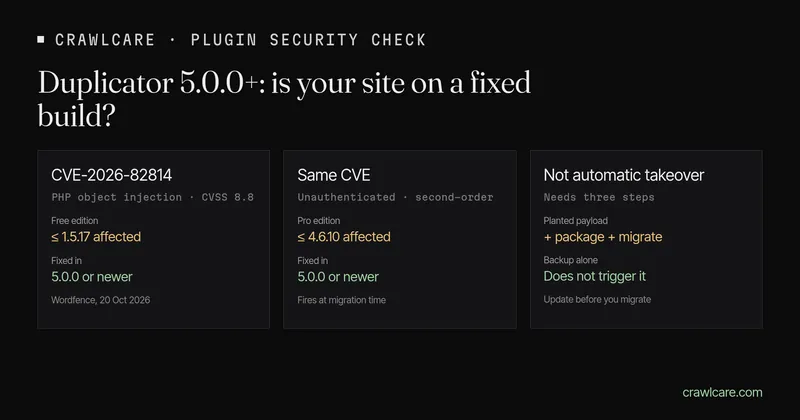
Duplicator CVE-2026-82814 affects Duplicator Free 1.5.17 and older and Pro 4.6.10 and older. Update to 5.0.0 or newer.
Duplicator is a WordPress backup and migration plugin used on more than a million sites. On 20 October 2026 Wordfence published CVE-2026-82814: an unauthenticated PHP object injection in Duplicator Free through 1.5.17 and Duplicator Pro through 4.6.10. The fix is 5.0.0 or newer. This post covers what that means, how to see your version, and what to do today.
Short version:
- Update Duplicator Free and Pro to 5.0.0 or newer before you build another package or run a migration.
- After you update, build a fresh package. Older packages keep the installer that built them, so a later standard migration from an old package can still reach the old code.
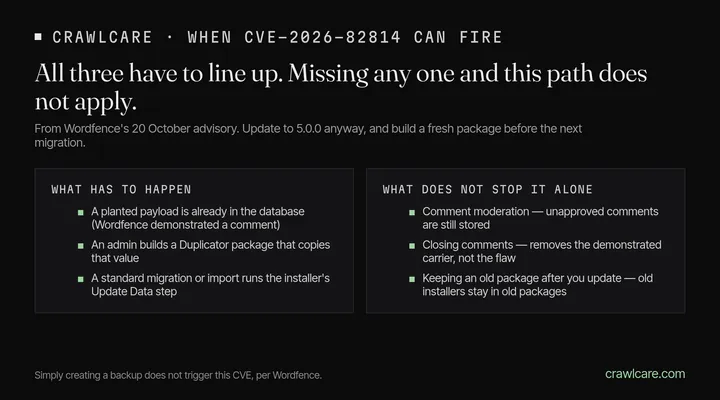
- This is not "every outdated install is owned". Wordfence describes a second-order bug: a planted payload has to sit in the database, an admin has to build a package that includes it, and then run a standard migration or import. Simply creating a backup does not trigger it.
- Wordfence's disclosure reports no attacks as of 20 October 2026. Treat the update as due anyway.
Want a quick outside check first? The instant plugin check flags Duplicator Free below 5.0.0 when the public readme (or a version string on the page) is readable. No email needed. Or jump to the free scan.
What Wordfence found
Wordfence's 20 October advisory (discovered with their Argus system) rates CVE-2026-82814 at CVSS 8.8 (High). The short version of their chain:
- An unauthenticated visitor posts a comment that holds an encoded PHP object. WordPress stores it even if it is waiting for moderation.
- An administrator later builds a Duplicator package that copies that stored value.
- The administrator runs a standard migration or import from that package.
- During the installer's Update Data step, a search-and-replace helper deserializes the stored value without restricting which classes may be created, and the object's methods run.
On Free, Wordfence showed operating-system command execution as the web-server user during a real migration. On Pro, they showed file deletion that, once wp-config.php was gone and the attacker reached the setup screen first, became a site takeover on a disposable test site.
Wordfence is clear about the boundaries: the payload must be stored before the package is built, and the admin must then run a standard migration or import that reaches the replacement step. They did not demonstrate the chain through restore or recovery modes. Comment moderation does not stop the chain, because an unapproved comment is still stored and can be copied into a package. Closing public comments removes the carrier they demonstrated, but is not a substitute for updating, because other attacker-controlled database content may also reach the same engine.
The vendor shipped the Free and Pro fix in 5.0.0 on 8 September 2026. Public disclosure was 20 October.
Who is affected
| Edition | Affected | Fixed |
|---|---|---|
| Duplicator Free | 1.5.17 and earlier | 5.0.0 or newer |
| Duplicator Pro | 4.6.10 and earlier | 5.0.0 or newer |
There is no 1.5.18 on the old Free branch. Sites that want the fix take the 5.0 line.
No Duplicator plugin on the site? This one is not about you.
How the exploit context is narrower than the install count
An outdated version is a known hole, not proof that anyone used it. For this CVE to fire the way Wordfence describes it, three things have to line up: a planted payload, a package built afterward, and a standard migration or import from that package. Sites that never migrate from Duplicator packages sit outside that path. Sites that do migrate should update first and build a fresh package.
How to see your version
- Plugins screen. In wp-admin go to Plugins and find Duplicator or Duplicator Pro. You want 5.0.0 or newer.
- Public readme (Free). Many sites still serve
/wp-content/plugins/duplicator/readme.txt. Open it and look for the Stable tag / version line. That is the same file our plugin check reads. - Instant check. Paste your address into the WordPress plugin check. If we can see Duplicator Free and it is below 5.0.0, you get a calm "matches a known issue" line — not a claim that anyone used it on your site. Pro versions are often not publicly readable from outside.
What to do today
- Update Free and Pro to 5.0.0+ from Plugins → update, or from your Duplicator.com account for Pro.
- Build a fresh package before any migration or import. Do not run a standard migration from a package built with an affected version.
- Remove leftover installer files that are no longer needed and publicly reachable, as Wordfence advises.
- If you cannot update today, do not run a standard migration or import from an affected package. Closing comments until you update removes only the demonstrated carrier, not the flaw.
What the free tools can and cannot see
The plugin check and the free CrawlCare scan look from outside. They read your homepage and, when it is public, the Duplicator Free readme. They flag Free versions below 5.0.0. They cannot see Pro licence builds that hide their version, whether a planted comment sits in your database, or whether you have old packages on disk. A clean result means we did not spot a match. Check Plugins in wp-admin for the full list.
Want a hand?
Rather not poke at plugins yourself? See services and pricing, or email hello@crawlcare.com.
Related reading: LiteSpeed Cache 7.9.2, the UpdraftCentral key compromise, and spotting a hacked WordPress site if something already looks off. See also Prime Mover CVE-2026-115806 (same season, smaller install base).
Quick answers
Does an old Duplicator version mean my site was hacked?
No. It means you are on a build that still has the published hole. Update, build a fresh package before the next migration, and dig further only if something already looks wrong on the site. The version alone does not prove anyone used this bug on you.
Does comment moderation protect me?
Not for this CVE. Wordfence says an unapproved comment is still stored and can be copied into a package. Closing public comments removes the carrier they demonstrated, but updating is the real fix.
Is creating a backup enough to trigger it?
No. Wordfence says simply creating a backup does not trigger the flaw. The risk sits with sites that run a standard migration or import from a package that already holds a planted payload.
Is this in CISA's KEV list?
Not as of 28 October 2026. Wordfence still rates it High (CVSS 8.8). Treat the update as due.
What is the CVE number again?
CVE-2026-82814. Fixed in Duplicator Free and Pro 5.0.0 and later.
Sources
- Wordfence: Argus discovers high severity unauthenticated PHP object injection in Duplicator (20 Oct 2026): CVE, versions, chain, workaround notes
- CVE-2026-82814 (when published)
- Duplicator changelog — 5.0.0 release line
Further reading
- Free website malware checks compared: CrawlCare, Sucuri SiteCheck, VirusTotal
- Prime Mover CVE-2026-115806: check your version
- Google says "This site may be hacked": what it means and how to clear it
- LiteSpeed Cache 7.9.2: check for CVE-2026-113499 and friends
- Is my PHP version end of life? How to upgrade WordPress
- PHP2Shell: what PHP's emergency release means for your site
- Core Web Vitals assessment failed: what it means and how to pass
- UpdraftCentral hack: is your WordPress site affected?
- Rank Math PRO 3.0.123, Backuply and Everest Backup: is your site affected?
- AIOSEO and Bricksforge security updates: is your site affected?
- Why is my website slow?
- How to fix Core Web Vitals
- Why isn't my site showing on Google?
- How to check your website SEO for free: a 10-minute checklist
- Is your site slow because of the code or the distance? Hosting for South African sites
- Is my WordPress site hacked? A step-by-step check