Prime Mover CVE-2026-115806: check your version
Published 28 Oct 2026
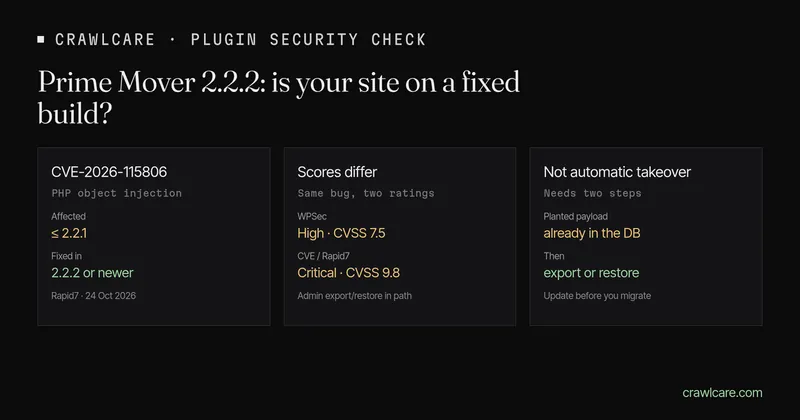
Prime Mover is a WordPress backup and migration plugin with a smaller install base than Duplicator. On 24 October 2026 Rapid7 listed CVE-2026-115806 for Prime Mover through 2.2.1: an unauthenticated PHP object injection during the migration search-and-replace step. The fix is 2.2.2. This short note covers the versions, how to check yours, and what to do before the next export or restore.
Short version:
- Update Prime Mover to 2.2.2 or newer before you export, restore or migrate.
- This is not "every outdated install is owned". The published chain needs a planted payload already in the database, then an administrator export or restore that runs the search-and-replace routine.
- WPSec rated the issue High (CVSS 7.5) with an admin action in the path. The CVE record Rapid7 mirrors rates it Critical (CVSS 9.8). Either way, treat 2.2.2 as due.
- Codexonics shipped 2.2.2 on 19 October 2026 with a hardened unserialize that only allows
stdClass.
Want a quick outside check first? The instant plugin check flags Prime Mover below 2.2.2 when the public readme (or a version string on the page) is readable. No email needed. Or jump to the free scan.
What Rapid7 and WPSec describe
WPSec WPSEC-2026-1305 (21 October) and Rapid7's CVE-2026-115806 entry (24 October) describe the same shape of bug:
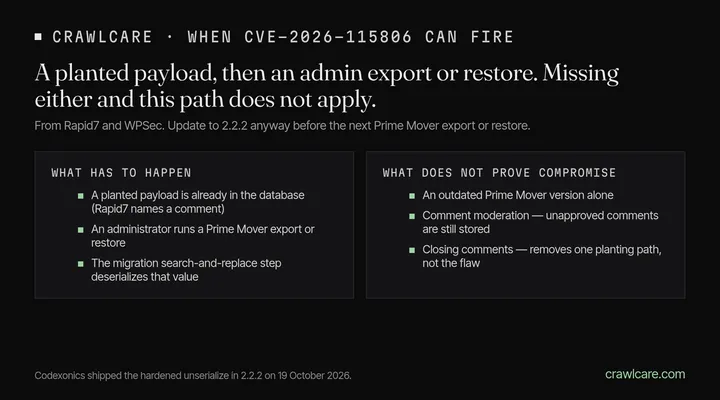
- An unauthenticated visitor can plant a serialized PHP object in stored content — Rapid7 names a comment submitted through the normal comment form.
- Later, an administrator runs a Prime Mover export or restore.
- During the migration search-and-replace step (
recursiveUnserializeReplace()), the plugin deserializes that stored value without restricting which classes may be created.
Rapid7's write-up says a Freemius gadget ships with the plugin, so no second plugin is required for a POP chain. WPSec's earlier note said no known POP chain lived in Prime Mover itself and that another plugin or theme would be needed. Either way: update before you export or restore.
Codexonics credited Civitasmass/Wordfence on the 2.2.2 security note and also updated the Freemius SDK in that release.
Who is affected
| Plugin | Affected | Fixed |
|---|---|---|
| Prime Mover – Backup and Migration | 2.2.1 and earlier | 2.2.2 or newer |
No Prime Mover on the site? This one is not about you. If you use Duplicator instead, see the companion Duplicator PHP object injection check (CVE-2026-82814).
How the context is narrower than "outdated = owned"
An outdated version is a known hole, not proof that anyone used it. For this CVE to fire the way the advisories describe it, a planted payload has to sit in the database first, and an administrator has to run an export or restore that reaches the search-and-replace step. Sites that never export or restore with Prime Mover sit outside that path. Sites that do should update first.
How to see your version
- Plugins screen. In wp-admin go to Plugins and find Prime Mover. You want 2.2.2 or newer.
- Public readme. Many sites still serve
/wp-content/plugins/prime-mover/readme.txt. Open it and look for the Stable tag / version line. - Instant check. Paste your address into the WordPress plugin check. If we can see Prime Mover and it is below 2.2.2, you get a calm "matches a known issue" line — not a claim that anyone used it on your site.
What to do today
- Update to 2.2.2+ from Plugins → update, or from the wordpress.org plugin page.
- Do not run an export or restore on an affected build until you have updated.
- If something already looks wrong on the site after a recent migration, dig further — the version alone does not prove this bug was used on you.
What the free tools can and cannot see
The plugin check and the free CrawlCare scan look from outside. They read your homepage and, when it is public, the Prime Mover readme. They flag versions below 2.2.2. They cannot see whether a planted comment sits in your database, or whether you have old export archives on disk. A clean result means we did not spot a match. Check Plugins in wp-admin for the full list.
Want a hand?
Rather not poke at plugins yourself? See services and pricing, or email hello@crawlcare.com.
Related reading: Duplicator PHP object injection check, LiteSpeed Cache 7.9.2, and spotting a hacked WordPress site if something already looks off.
Quick answers
Does an old Prime Mover version mean my site was hacked?
No. It means you are on a build that still has the published hole. Update before the next export or restore, and dig further only if something already looks wrong on the site. The version alone does not prove anyone used this bug on you.
Does comment moderation protect me?
Not for the carrier Rapid7 describes. An unapproved comment is still stored. Closing public comments removes one planting path, but updating is the real fix.
Is creating a backup enough to trigger it?
The published path sits with the search-and-replace step of an export or restore, not with "the plugin is installed." Update before you run those jobs on an affected build.
What is the CVE number again?
CVE-2026-115806. Fixed in Prime Mover 2.2.2 and later. Also tracked as WPSEC-2026-1305.
Sources
- Rapid7: CVE-2026-115806 (24 Oct 2026): CVE summary, CVSS 9.8, comment planting, export/restore trigger
- WPSec: WPSEC-2026-1305 (21 Oct 2026): versions, High 7.5, migration/restore search-replace context
- Codexonics: Prime Mover 2.2.2 (19 Oct 2026): hardened unserialize, Freemius update
- CVE-2026-115806
Further reading
- Free website malware checks compared: CrawlCare, Sucuri SiteCheck, VirusTotal
- Duplicator CVE-2026-82814: are you affected?
- Google says "This site may be hacked": what it means and how to clear it
- LiteSpeed Cache 7.9.2: check for CVE-2026-113499 and friends
- Is my PHP version end of life? How to upgrade WordPress
- PHP2Shell: what PHP's emergency release means for your site
- Core Web Vitals assessment failed: what it means and how to pass
- UpdraftCentral hack: is your WordPress site affected?
- Rank Math PRO 3.0.123, Backuply and Everest Backup: is your site affected?
- AIOSEO and Bricksforge security updates: is your site affected?
- Why is my website slow?
- How to fix Core Web Vitals
- Why isn't my site showing on Google?
- How to check your website SEO for free: a 10-minute checklist
- Is your site slow because of the code or the distance? Hosting for South African sites
- Is my WordPress site hacked? A step-by-step check