WordPress 7.1.4: what it means for your site
Published 29 Oct 2026
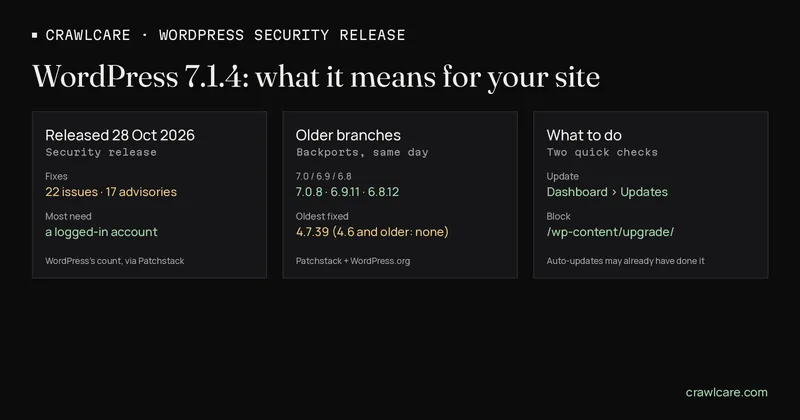
WordPress 7.1.4 came out on 28 October 2026. It's a security release, and WordPress.org's advice is to update straight away. By WordPress's own count (via Patchstack) that's 22 fixes across 17 advisories. Here's who gets it automatically, who has to click the button, and how to see where your site stands.
Short version:
- Update to 7.1.4, or to the fixed build for your branch if you're on an older one (7.0.8, 6.9.11, 6.8.12 and so on, down to 4.7.39).
- Almost every fix needs a logged-in account first, usually Contributor or higher. Two don't.
- The one people will talk about is a remote code execution bug in the upgrade process. It needs no login, but it only works in the few seconds while an update runs, and only if
/wp-content/upgrade/is reachable over the web. Patchstack wouldn't call it practical to exploit. - Sites with automatic background updates should pick this up by themselves. Check anyway.
Want a quick outside look? The free scan now reads your WordPress version where the site shows it and checks whether /wp-content/upgrade/ answers over the web. Plain page reads, nothing clever.
What 7.1.4 fixes
The WordPress.org release post lists the reports. There are several stored cross-site scripting (XSS) bugs, a stored denial of service bug in the Interactivity API, a Notes permission fix, and an update to the bundled root certificates (eMudhra). Plus the two below that need no login.
Patchstack's write-up adds the requirements. Nearly all of these need someone with an account, usually Contributor or higher. The two that need no account:
- The upgrade-process bug. A race condition while WordPress installs or updates something, which can end in remote code execution. More on that below.
- Unpublished Customizer changesets. Visitors who weren't logged in could find Customizer changes that hadn't been published yet.
The upgrade-window bug, in plain English
When WordPress updates anything, it unpacks the package into wp-content/upgrade/. Before 7.1.4, that folder's name was predictable, and if the web could reach it, an attacker had a few seconds to get in. Patchstack scored it as hard to pull off (AC:H) because an attacker has to hit the right address at the exact moment an update runs. It still needs no account, and the window opens on any update, automatic ones included.
7.1.4 adds 16 random characters to the folder name, puts an index.php back in it, and stops wp-config.php being copied there. Patchstack's extra advice is server-side: deny access to /wp-content/upgrade/ and make sure it isn't listable.
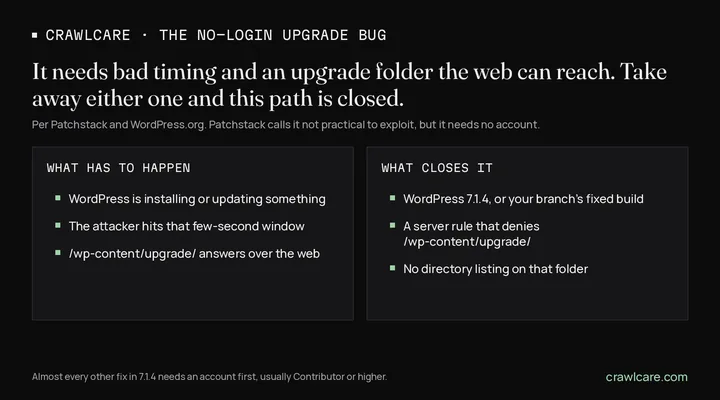
On Apache, a one-line .htaccess file inside wp-content/upgrade/ with Require all denied does it. On Nginx, ask your host to add a deny all rule for that path. Updates still work, since WordPress writes to the folder on disk, not over the web.
Who gets it automatically
WordPress.org says sites that support automatic background updates will start updating by themselves. For most normal installs that's the default for security releases, so plenty of sites are already on 7.1.4 without anyone lifting a finger.
Older branches get their own fixed builds. WordPress.org says backports to every branch through 4.7 will ship as they're ready. Patchstack lists them as shipped the same day: 7.0.8, 6.9.11, 6.8.12, 6.7.11, 6.6.11, 6.5.14, 6.4.14 and on down to 4.7.39. Anything on 4.6 or older gets nothing.
Who has to update by hand
If you run your own server, VPS or a plain cPanel install, it's on you. Same if someone switched off automatic updates, a plugin manages updates for you, or the site is deployed from Git where WordPress can't touch its own files. Those setups often skip background updates on purpose. That's fine, as long as someone actually does the update.
On a managed WordPress host? They usually roll security releases out for you. Have a look at the version anyway, it takes ten seconds.
How to check your site
- Dashboard → Updates. It shows your current version. You want 7.1.4, or the fixed build for your branch.
- The upgrade folder. Open
https://yoursite.com/wp-content/upgrade/in a browser. A 403 Forbidden or a 404 is what you want. A file list means it's browsable, so block it. A blank page means it answers, which is better than a list, but still worth blocking. - Your users. Patchstack's other tip: look at who holds Contributor or higher, since that's where most of these bugs start. Old guest-writer accounts can go.
- The free scan. Run the CrawlCare scan. It reads the version from your generator tag, RSS feed or readme.html when they show it, and says "hidden" when they don't. It doesn't guess. It also does one plain request to
/wp-content/upgrade/to see whether it answers.
What the free scan can and cannot see
The scan looks from outside, like any visitor. Lots of sites hide their WordPress version, which is fine. When it's hidden we say so and point you to the Updates screen. A clean result means we didn't spot a problem, not that there isn't one. We never try to exploit anything.
Want a hand?
Rather not fiddle with server rules? See services and pricing, or email hello@crawlcare.com.
Related reading: spotting a hacked WordPress site, the PHP2Shell release, and the free WordPress plugin check.
Quick answers
Was my site hacked because it's below 7.1.4?
No. An older version means the holes are still open, not that anyone used them. Update, block the upgrade folder, and only dig deeper if something already looks off.
My site updates itself. Do I need to do anything?
Check Dashboard → Updates says 7.1.4 (or your branch's fixed build). Blocking /wp-content/upgrade/ at the server is still a cheap extra, as Patchstack suggests.
Is the upgrade bug easy to exploit?
Patchstack doesn't think so. It needs an update running and a reachable upgrade folder at the same moment. It needs no login though, so update and block the folder.
I'm on an old branch like 6.4. Do I have to jump to 7.1?
Not for this fix. 6.4.14 has it, and other branches back to 4.7 have their own builds. Being on the newest version is still the easy life, so plan the move.
Sources
- WordPress.org: WordPress 7.1.4 (28 Oct 2026): release, fixes, automatic updates, backports
- Patchstack: WordPress 7.1.4 Security Release (28 Oct 2026): the 22/17 count, who can trigger what, upgrade-folder fix and advice, backport versions
- WordPress.org version status API (checked 29 Oct 2026): newest build per branch
Further reading
- Free website malware checks compared: CrawlCare, Sucuri SiteCheck, VirusTotal
- Prime Mover CVE-2026-115806: check your version
- Duplicator CVE-2026-82814: are you affected?
- Google says "This site may be hacked": what it means and how to clear it
- LiteSpeed Cache 7.9.2: check for CVE-2026-113499 and friends
- Is my PHP version end of life? How to upgrade WordPress
- PHP2Shell: what PHP's emergency release means for your site
- Core Web Vitals assessment failed: what it means and how to pass
- UpdraftCentral hack: is your WordPress site affected?
- Rank Math PRO 3.0.123, Backuply and Everest Backup: is your site affected?
- AIOSEO and Bricksforge security updates: is your site affected?
- Why is my website slow?
- How to fix Core Web Vitals
- Why isn't my site showing on Google?
- How to check your website SEO for free: a 10-minute checklist
- Is your site slow because of the code or the distance? Hosting for South African sites
- Is my WordPress site hacked? A step-by-step check