The UpdraftPlus hack: what to check on your WordPress site now
Published 1 Nov 2026
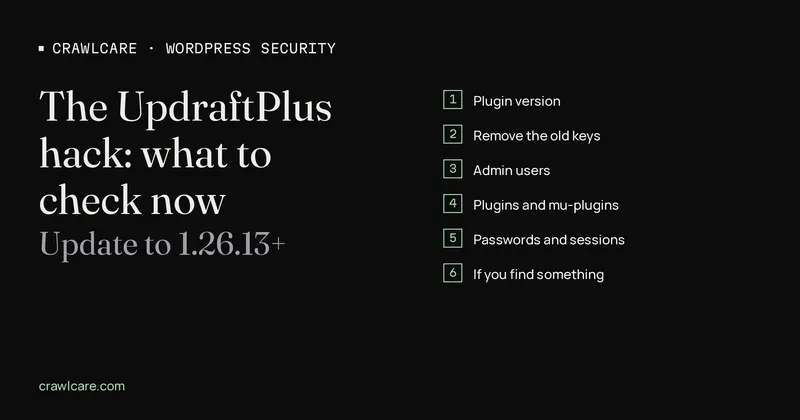
If your site runs UpdraftPlus and was ever connected to UpdraftCentral Cloud, updating the plugin is only the start. Attackers used stolen connection keys to install plugins and create admin accounts on live sites, and an update doesn't remove anything they left behind.
TeamUpdraft confirmed this in an update to its incident page on 29 October. Some sites were compromised during the original attack, looked fine afterwards, and later got a new administrator account from a plugin the attacker had left in place. Those sites had already been disconnected from UpdraftCentral when it happened.
So if you updated on the 20th and moved on, go back and look.
What happened
Over the weekend of 17 and 18 October, someone got into teamupdraft.com. TeamUpdraft says its customer database was probably accessed. That database held account details, password hashes, 2FA settings, and the connection keys for UpdraftCentral, UpdraftVault and UpdraftClone.
UpdraftCentral is the remote dashboard for managing many WordPress sites from one place. A connection key lets it send commands to a site: run a backup, restore, update or install plugins. Whoever holds the key gets to do the same.
That's what the attackers did. Overnight on 18 to 19 October they used the keys to install backdoor plugins and create admin users on connected sites. The plugin code itself wasn't the weak point; the keys were. TeamUpdraft says the plugin downloads and self-hosted UpdraftCentral weren't affected.
Patchstack puts UpdraftPlus on 4+ million sites. Most of them never touched UpdraftCentral Cloud, but plenty of agencies and freelancers use it for exactly the reason it's useful: dozens of client sites from one screen.
The version detail most people missed
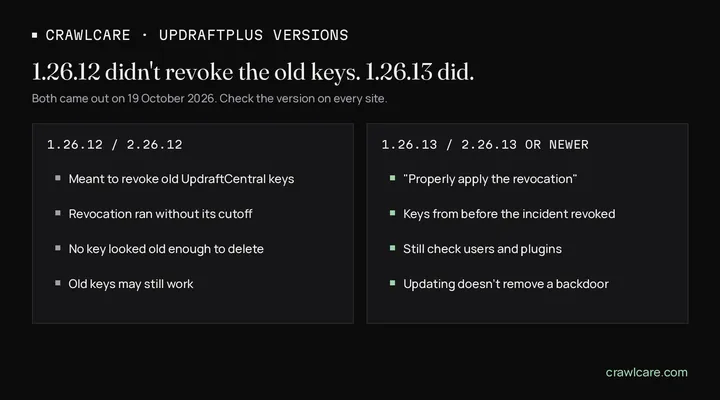
TeamUpdraft pushed 1.26.12 (free) and 2.26.12 (Premium) on 19 October to revoke the old keys. That release didn't work. According to WPSec's write-up, the revocation routine ran without its cutoff timestamp, so no key looked old enough to delete, and nothing was removed. 1.26.13 and 2.26.13 came out the same evening with the line "Properly apply the revocation in 1.26.12" in the changelog.
Sources differ on the exact cutoff. TeamUpdraft's incident page now says the update disconnects every UpdraftCentral connection made before 13:07 BST on 18 October. The version of that page quoted in the earlier UpdraftCentral post on 20 October said 22:00 BST.
Check you're on 1.26.13 / 2.26.13 or newer. TeamUpdraft's incident page says WordPress.org pushed the free version out as an auto-update. Premium copies, staging sites and sites with auto-updates switched off need checking by hand.
What to check, site by site
Do this from each site's own wp-admin, not through UpdraftCentral. Do it on every site that was ever connected to UpdraftCentral Cloud, including ones you've since disconnected and ones that look normal.
1. Plugin version
Plugins > UpdraftPlus. You want 1.26.13+ (free) or 2.26.13+ (Premium).
2. Remove the old keys
Settings > UpdraftPlus > Advanced Tools > UpdraftCentral > Manage existing keys. Delete everything. If you still need UpdraftCentral, reconnect later with a new key, once the site is clean.
3. Admin users
Users > filter by Administrator. Look for names you don't know and for accounts created on or after 17 October.
Don't trust that screen on its own. Recent WordPress backdoors, including the one used in this month's Ninja Forms campaign, hide their admin account from the Users list. If you have WP-CLI:
wp user list --role=administrator --fields=ID,user_login,user_email,user_registered
Or straight from the database (adjust the table prefix):
SELECT u.ID, u.user_login, u.user_email, u.user_registered
FROM wp_users u
JOIN wp_usermeta m ON m.user_id = u.ID
WHERE m.meta_key = 'wp_capabilities'
  AND m.meta_value LIKE '%administrator%';
If the database shows more admins than the dashboard, something is filtering the list. Treat that site as compromised.
4. Plugins, including mu-plugins
Plugins > Installed Plugins, and the Must-Use tab if there is one. Anything you didn't install goes.
Then look at the file system, because a plugin can hide itself from the list too:
ls -la wp-content/plugins/
ls -la wp-content/mu-plugins/
find wp-content -name "*.php" -newermt "2026-10-17" -not -path "*/cache/*"
The last command lists PHP files changed since 17 October. On a site that auto-updates, you'll get a lot of legitimate results. You're looking for folders you don't recognise and loose PHP files in odd places, like uploads.
5. Passwords and sessions
Change the password for every administrator. Then end existing sessions, because a changed password doesn't log out someone who's already in. With WP-CLI:
wp user session destroy --all <user>
Rotating the salts in wp-config.php logs everyone out in one go. Get fresh ones from https://api.wordpress.org/secret-key/1.1/salt/.
6. If you find something
Removing a rogue user and a plugin folder might be enough. Often it isn't. TeamUpdraft's 29 October update is the proof: a plugin left in place created a new admin later, after the key route was closed.
If you find anything you can't explain, restore from a backup taken before 17 October. Then repeat steps 1 to 5 on the restored site, because the old backup brings back the old keys and the old passwords too.
Why updating isn't the same as being clean
This applies to most of what hit WordPress in October, not just UpdraftPlus. Ninja Forms and WPC Product Bundles were both exploited this month too. Updating stops new attacks; it doesn't remove an existing infection.
An update fixes the door. It does nothing about whoever already walked through it. A backdoor plugin doesn't need the original hole once it's installed.
The owner patched, saw nothing odd, and three weeks later there's spam in Google's index or a redirect on mobile only. The access was there the whole time.
If you manage client sites
If you're an agency or freelancer who connected client sites to UpdraftCentral Cloud, you have a list of every site that was at risk. Work through it today. Tell clients what you're doing, even if you find nothing. A short note listing what was checked is a much easier conversation than explaining a hack later.
Keep a short note per site: version, keys removed, admin count in the database, unknown files found or not, passwords rotated. If a site turns up dirty a month from now, you'll want that record.
Where CrawlCare fits
You can do everything above yourself, and if you're comfortable in wp-admin and on the command line you should. If you've got a lot of sites, or you'd rather someone else looked, CrawlCare runs free site scans at crawlcare.com that flag outdated plugins and visible signs of trouble. For sites that need more, CrawlCare also offers hands-on clean-ups and hardening. Either way, don't leave a site that was connected to UpdraftCentral Cloud unchecked.
Related: how to remove malware from a WordPress site, and is my WordPress site hacked? A step-by-step check.
Sources
- TeamUpdraft incident page: https://teamupdraft.com/blog/security-incident-october-2026/
- UpdraftPlus changelog: https://teamupdraft.com/updraftplus/changelog/
- Patchstack, stolen UpdraftCentral keys (backdoor installs 18 October 15:32 to 19 October 09:23 UTC): https://patchstack.com/articles/updraftcentral-key-compromise-wordpress-backdoors/
- WPSec advisory WPSEC-2026-1273: https://wpsec.com/vuln/WPSEC-2026-1273/
- The Hacker News: https://thehackernews.com/2026/10/attackers-abuse-updraftcentral-keys-to.html
- BleepingComputer on the Ninja Forms / WPC Product Bundles campaign: https://www.bleepingcomputer.com/news/security/ninja-forms-plugin-flaw-exploited-to-hack-wordpress-sites/
Further reading
- Free website malware checks compared: CrawlCare, Sucuri SiteCheck, VirusTotal
- WordPress 7.1.4: what it means for your site
- Prime Mover CVE-2026-115806: check your version
- Duplicator CVE-2026-82814: are you affected?
- Google says "This site may be hacked": what it means and how to clear it
- LiteSpeed Cache 7.9.2: check for CVE-2026-113499 and friends
- Is my PHP version end of life? How to upgrade WordPress
- PHP2Shell: what PHP's emergency release means for your site
- Core Web Vitals assessment failed: what it means and how to pass
- UpdraftCentral hack: is your WordPress site affected?
- Rank Math PRO 3.0.123, Backuply and Everest Backup: is your site affected?
- AIOSEO and Bricksforge security updates: is your site affected?
- Why is my website slow?
- How to fix Core Web Vitals
- Why isn't my site showing on Google?
- How to check your website SEO for free: a 10-minute checklist
- Is your site slow because of the code or the distance? Hosting for South African sites
- Is my WordPress site hacked? A step-by-step check
- How to remove malware from a WordPress site (step by step)