Gravity Forms 3.1.2 flaw (CVE-2026-103039): how to check your site and fix it
Published 2 Nov 2026
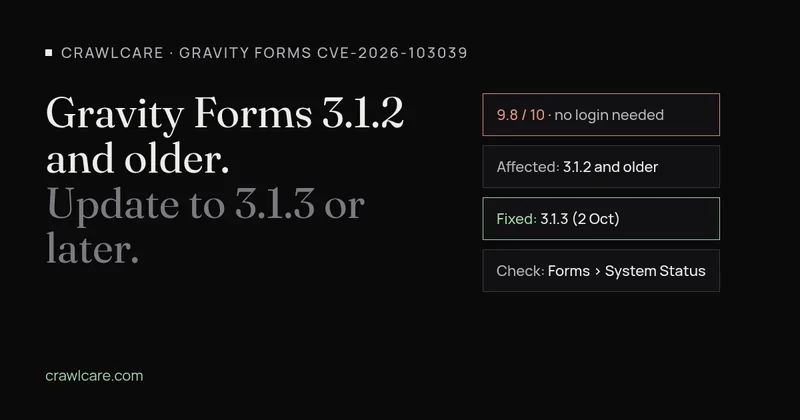
If your site runs Gravity Forms 3.1.2 or older, update it. On 29 October 2026 Wordfence published a critical flaw in the plugin, tracked as CVE-2026-103039 and scored 9.8 out of 10. Nobody needs to log in to use it. Anyone who can submit the right kind of form can have a go. The fix is Gravity Forms 3.1.3, and the current release on the vendor's changelog is 3.2.1.
The fix shipped weeks before the flaw went public. Gravity Forms released 3.1.3 on 2 October with a changelog line that only said "Added security enhancements." Plenty of sites updated without knowing what they were getting. The ones that didn't are now running a version with a public write-up, and a GitHub repository claiming a proof of concept appeared on 31 October.
Don't know your version off-hand? In wp-admin it's under Forms > System Status. Or skip to the checks.
What the flaw does
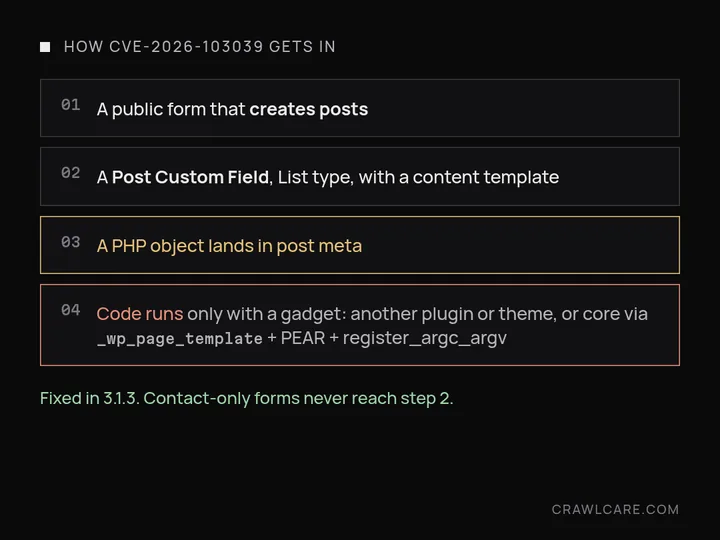
Gravity Forms can turn a form submission into a WordPress post. One of the fields that does this is the Post Custom Field, which writes a submitted value into the new post's custom fields (post meta). You'll find it under Post Fields in the form editor.
According to the advisory, the trouble starts with a Post Custom Field set to the List input type with a content template switched on. In that setup the submitted row goes through WordPress's general maybe_unserialize() function. Gravity Forms added its own safer version in 3.1.1 that refuses to build PHP objects, but this code path never used it. So an attacker can plant a PHP object in your post meta from a public form.
That object does nothing on its own, because Gravity Forms has no code an attacker can chain it to. The danger comes from whatever else is on the site. Another plugin or theme can supply that code. The advisory also describes a route through WordPress core itself: if the custom field is mapped to the _wp_page_template meta key, and the server has a readable PEAR install and register_argc_argv switched on, it ends in remote code execution. In plain terms, the attacker gets to run their own code on your server.
Is anyone attacking it yet?
The sources disagree. Patchstack labels the flaw as known to be exploited. The CISA assessment in the CVE record rates exploitation as "none", and the CVE isn't on CISA's KEV list (the catalogue of flaws seen in real attacks). Censys reported no confirmed exploitation as of 30 October and noted that Patchstack doesn't name its source.
I wouldn't wait for that argument to settle. The patch is a month old, the details are public and there's a claimed proof of concept. Update now and look for damage afterwards.
Who is affected
Every Gravity Forms version up to and including 3.1.2. The dangerous path needs a form that creates posts and uses a Post Custom Field of the List type with a content template. If you only use Gravity Forms for contact forms, quotes and bookings, you probably don't have that field. Update anyway. The same disclosure batch included two cross-site scripting bugs that also need no login: CVE-2026-90437 (fixed in 3.1.2) and CVE-2026-97645 in the List field (fixed in 3.1.3).
| CVE | What it is | Fixed in |
|---|---|---|
| CVE-2026-103039 | PHP object injection via a Post Custom Field, no login needed (9.8) | 3.1.3 |
| CVE-2026-97645 | Stored cross-site scripting in the List field, no login needed | 3.1.3 |
| CVE-2026-90437 | Stored cross-site scripting, no login needed | 3.1.2 |
One odd detail. The Gravity Forms docs say Create Content Template is only offered when a Post Custom Field's type is Single Line Text or Paragraph Text. The advisory describes it on a List field. PowerSEC spotted this mismatch too. A field that once had a template and was later switched to List could still hold that setting even when you can't see the checkbox. A missing checkbox isn't proof you're safe.
Post Custom Fields can't be used with the Advanced Post Creation Add-On, which uses standard fields. If your posts come from that add-on, this particular path isn't the one you're using.
How to check your site
- Find the version. In wp-admin go to Forms > System Status and read the Gravity Forms version (not the database version further down). Or check the Plugins screen. With WP-CLI:
wp plugin get gravityforms --field=version - 3.1.3 or higher? The hole is closed. Still do step 4 if you have forms that create posts, because an update doesn't undo anything that happened before it.
- 3.1.2 or lower? List your forms that create posts. Open each one and look for Post Custom Field fields. Note the field type, the Custom Field Name, and whether any of them point at
_wp_page_template. - Look at what those forms made recently: new posts or drafts you don't recognise, and odd values in their custom fields.
How to fix it
Back up files and the database first. Gravity Forms' own manual-update guide says so, and it's cheap insurance. Then update to 3.1.3 or later. Three things commonly stop that update from arriving on its own.
You're still on Gravity Forms 2.x. Moving from 2.x to 3.x is a major version, and Gravity Forms says major versions don't auto-update. Someone has to click the button. The changelog warns 2.x to 3.x may include breaking changes and suggests testing in a sandbox first, so do it on a staging copy if you can, and check every form still submits.
Your licence has expired. Gravity Forms keeps working on an expired licence, but you stop getting updates, security fixes included, and you can't download the plugin files. Renew, then update.
Automatic updates are off. Check the Plugins screen and Forms > Settings to see whether background updates are on for Gravity Forms.
To update by hand, download the zip from your Gravity Forms account, go to Plugins > Add New > Upload Plugin, choose the file and click "Replace current with uploaded." Don't use the Uninstall button under Forms > Settings. Gravity Forms warns it removes your form data.
If you have the Gravity Forms CLI add-on and a valid licence key:
wp gf update
wp gf version
After updating, clear your page cache and any host or CDN cache. The 3.1.3 release post asks for that too.
Can't update today? Take down any public form that creates posts with a List-type Post Custom Field until you can. Ask your host whether register_argc_argv is off for web requests and whether PEAR sits on the PHP include path. Turning those off closes the core route described in the advisory, though not chains through other plugins.
If you think you've already been hit
Updating stops new attempts. It doesn't remove anything an attacker already put on the site.
Start with the database. This read-only query, from WPdeeply's write-up, lists post meta that holds serialized PHP objects. Change wp_ if your table prefix is different. Some plugins store objects for good reasons, so treat hits as leads to check, not proof.
wp db query "SELECT post_id, meta_key, LEFT(meta_value, 200) AS sample
FROM wp_postmeta
WHERE meta_value REGEXP '(^|;)O:[0-9]+:'
ORDER BY post_id DESC
LIMIT 100;"
Then check _wp_page_template values against the templates your theme actually has. Look for admin accounts, plugins, must-use plugins, scheduled tasks or PHP files you didn't create, and for changes to the site URL or admin email. Our hacked redirect check also shows whether your homepage acts differently for Google, a common sign once a hack is in.
If something's wrong:
- Write down what you found and when. The WordPress.org guide for hacked sites starts here, and it helps whoever cleans up.
- Take a snapshot of the site as it is, infected or not, before you change anything.
- Restore from a backup you know is clean if you have one. Deleting the suspicious form entry on its own won't remove a backdoor.
- Change every password: WordPress users, hosting panel, SFTP/SSH, database. Replace the secret keys in
wp-config.phpto log everyone out. - Update Gravity Forms and everything else, then change the passwords again once the site is clean.
- Tell your host. On shared hosting a hack can reach beyond your own site.
More on the clean-up itself in how to remove malware from WordPress.
Not sure where your site stands?
Our free scan lists the WordPress plugin versions your homepage gives away and checks them against published security bugs. It can't see your form settings or database, so treat it as a first pass. Run a free scan, or open the chat and tell us which Gravity Forms version you have and whether your forms create posts.
Quick answers
Does an old Gravity Forms version mean my site was hacked?
No. It means the hole is still open. The risky path also needs a form that creates posts with a List-type Post Custom Field. Update first, then check those forms and your post meta if you have them.
I only use Gravity Forms for contact forms. Do I still need to update?
Yes. Your forms probably can't reach this bug, but the same batch fixed two cross-site scripting bugs that don't need a login, and you'll want 3.1.3 or later for those anyway.
Why didn't my site update on its own?
The usual reasons are an expired licence, which stops updates, being on 2.x, since major versions never auto-update, or background updates being off in Forms > Settings or on the Plugins screen.
Is CVE-2026-103039 being used in attacks?
Sources disagree. Patchstack says it is, CISA's assessment says no exploitation, and Censys had no confirmed cases as of 30 October. The details and a claimed proof of concept are public, so update now.
Further reading
- Chrome says your WordPress sitemap uses XSLT. Your SEO is fine.
- WordPress plugin closed on wordpress.org? What to do now
- Free website malware checks compared: CrawlCare, Sucuri SiteCheck, VirusTotal
- WordPress 7.1.4: what it means for your site
- Prime Mover CVE-2026-115806: check your version
- Duplicator CVE-2026-82814: are you affected?
- Google says "This site may be hacked": what it means and how to clear it
- LiteSpeed Cache 7.9.2: check for CVE-2026-113499 and friends
- Is my PHP version end of life? How to upgrade WordPress
- PHP2Shell: what PHP's emergency release means for your site
- Core Web Vitals assessment failed: what it means and how to pass
- UpdraftCentral hack: is your WordPress site affected?
- Rank Math PRO 3.0.123, Backuply and Everest Backup: is your site affected?
- AIOSEO and Bricksforge security updates: is your site affected?
- Why is my website slow?
- How to fix Core Web Vitals
- Why isn't my site showing on Google?
- How to check your website SEO for free: a 10-minute checklist
- Is your site slow because of the code or the distance? Hosting for South African sites
- Is my WordPress site hacked? A step-by-step check
- How to remove malware from a WordPress site (step by step)
- The UpdraftPlus hack: what to check on your WordPress site now