php2shell: CISA says the PHP flaws are being exploited. Three checks for your site
Published 2 Nov 2026
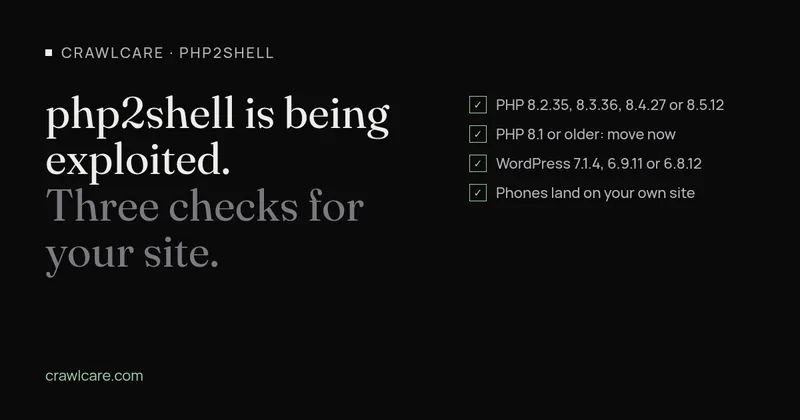
On 26 October 2026 the US Cybersecurity and Infrastructure Security Agency (CISA) added two PHP flaws to its Known Exploited Vulnerabilities list. A flaw only goes on that list once CISA has evidence that attackers are using it. Security researchers call this pair "php2shell".
PHP is the language WordPress runs on, so nearly every WordPress site depends on it. If yours is on a small business host, it's worth ten minutes this week.
What CISA says
The two flaws are CVE-2026-109618 (memory corruption) and CVE-2026-109619 (stale request state). CISA's list entries describe both as allowing "unauthenticated remote code execution". In plain terms, someone with no login could run their own code on the server.
CISA's alert says the flaws affect "all PHP installations serving web requests", including Apache with mod_php, PHP-FPM, php-cgi, FrankenPHP and LiteSpeed. Those cover the usual ways shared hosts run PHP.
NVD, the US government's vulnerability database, rates both 9.2 out of 10, which it classes as critical (109618, 109619).
Check 1: your PHP version
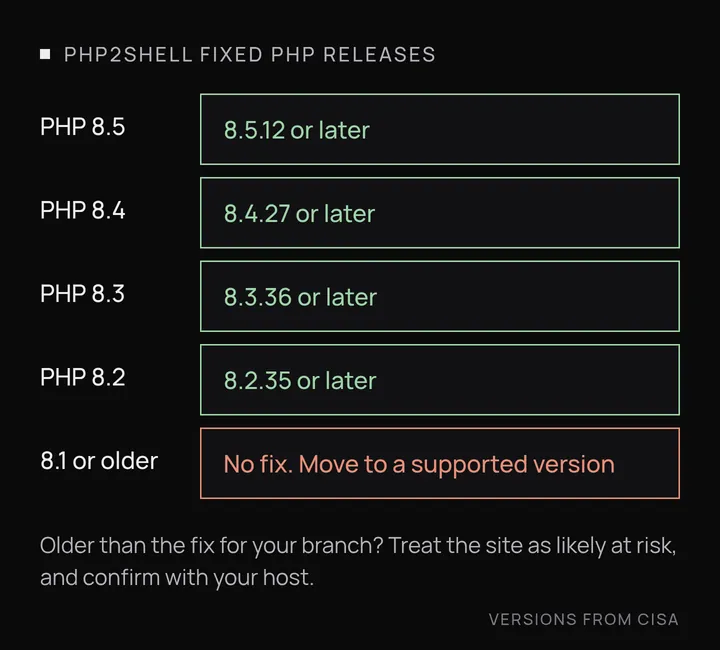
The fixed releases are PHP 8.2.35, 8.3.36, 8.4.27 and 8.5.12. Your host's control panel usually shows the version under something like "PHP version" or "Select PHP version". In WordPress you can also go to Tools, then Site Health, then Info, then Server.
If your version is older than the fixed release for its branch, treat the site as likely at risk, and confirm with your host. You need their answer because some Linux distributions and paid support services patch older PHP builds without changing the version number. A site showing "7.4" might have the fix or might not, and from outside you can't tell.
Prefer a quick outside view first? Paste your address into the free php2shell check. It shows the PHP version your server admits to, if it shows one, and compares it with the fixed releases. No email needed.
NVD lists slightly different starting points for the two flaws. CVE-2026-109618 affects PHP from 7.3.0 onwards. CVE-2026-109619 goes back to 5.4.0. The fixed releases are the same for both, so the version check works the same way.
CISA is blunt about anything older. Its alert says organisations "that cannot update immediately, or that continue to use PHP 8.1 or earlier unsupported versions, should take PHP-based systems offline until they can be patched or updated." For a small business site, that means asking your host to move you to a supported, patched PHP version now. If they can't, the site should come down until they can. Before switching PHP versions, take a backup, because old themes and plugins sometimes break on newer PHP.
Check 2: your WordPress version
This one is a separate problem. php2shell is a PHP flaw, and updating WordPress won't fix it.
WordPress has its own exploited bug, CVE-2026-87902. It lets someone with no login make WordPress load a PHP file it shouldn't, and on some server and theme setups that can lead to running code. CISA added it to the exploited list on 25 September 2026.
WordPress 7.1.2 fixed it, but WordPress has put out two more security releases since then, 7.1.3 and 7.1.4. WordPress now marks 7.1.2 and 7.1.3 as insecure. You want:
- 7.1.4 or later, or
- 6.9.11 or 6.8.12 if your site stays on an older branch.
You'll find your version under Dashboard, then Updates, or at the bottom right of most admin screens.
While you're in wp-admin anyway, run the free WordPress plugin check too. It lists the plugin versions your homepage gives away and flags any with known holes.
Check 3: where phones end up
When a site has been tampered with, the change often only shows for some visitors. A common pattern is redirecting phone visitors, or people arriving from Google, to a spam or scam site, while the owner on a desktop sees nothing wrong.
To test it:
- On your phone, with mobile data rather than office Wi-Fi, search Google for your business and tap your own result.
- Do the same in a private browser tab.
- Check that you land on your own site and stay there.
If you get sent somewhere you don't recognise, don't try to clean it up by deleting files. Talk to your host or a developer. A redirect like this doesn't prove the site was broken into, but you need to know why it's happening.
If you're not sure
Three questions cover most of it: is PHP on a fixed release, is WordPress on 7.1.4 (or 6.9.11 or 6.8.12), and do phones land where they should? If you'd like a second pair of eyes, we can run a free scan of your site, or you can book a chat and ask us anything.
Sources
- CISA Known Exploited Vulnerabilities entries: CVE-2026-109618, CVE-2026-109619, CVE-2026-87902
- CISA alert, last revised 26 October 2026: Critical Vulnerabilities in PHP Require Immediate Patching
- NVD: CVE-2026-109618, CVE-2026-109619, CVE-2026-87902
- WordPress releases: 7.1.2, 7.1.3, 7.1.4
Further reading
- Chrome says your WordPress sitemap uses XSLT. Your SEO is fine.
- Gravity Forms 3.1.2 flaw (CVE-2026-103039): how to check your site and fix it
- WordPress plugin closed on wordpress.org? What to do now
- Free website malware checks compared: CrawlCare, Sucuri SiteCheck, VirusTotal
- WordPress 7.1.4: what it means for your site
- Prime Mover CVE-2026-115806: check your version
- Duplicator CVE-2026-82814: are you affected?
- Google says "This site may be hacked": what it means and how to clear it
- LiteSpeed Cache 7.9.2: check for CVE-2026-113499 and friends
- Is my PHP version end of life? How to upgrade WordPress
- PHP2Shell: what PHP's emergency release means for your site
- Core Web Vitals assessment failed: what it means and how to pass
- UpdraftCentral hack: is your WordPress site affected?
- Rank Math PRO 3.0.123, Backuply and Everest Backup: is your site affected?
- AIOSEO and Bricksforge security updates: is your site affected?
- Why is my website slow?
- How to fix Core Web Vitals
- Why isn't my site showing on Google?
- How to check your website SEO for free: a 10-minute checklist
- Is your site slow because of the code or the distance? Hosting for South African sites
- Is my WordPress site hacked? A step-by-step check
- How to remove malware from a WordPress site (step by step)
- The UpdraftPlus hack: what to check on your WordPress site now