UpdraftPlus and LiteSpeed Cache: which versions are safe in Nov 2026, and how to check yours in 2 minutes
Published 4 Nov 2026
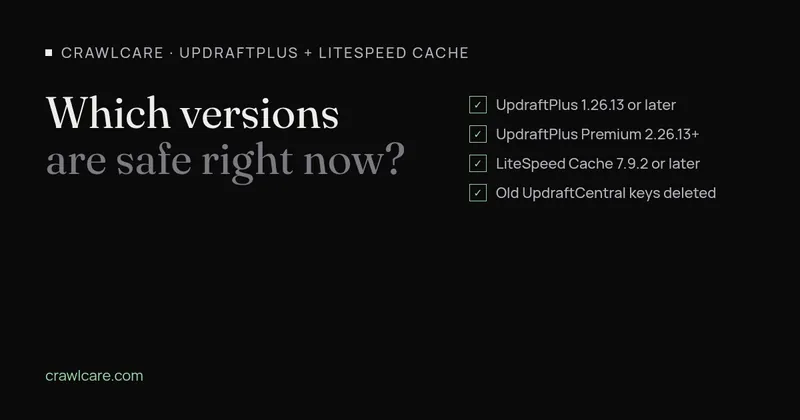
UpdraftPlus and LiteSpeed Cache are two of the most common plugins on small WordPress sites, and both have had serious security fixes in the last few months. Below are the versions you need and a quick way to check yours.
What we found on real sites
We recently checked 107 small-business websites from the outside, the way any visitor could. 54 of them run WordPress.
UpdraftPlus showed a version number on 7 of those sites. Five were on 1.26.13 or later, which is fine. Two weren't: one on 1.26.5 and one on 1.26.4. The site on 1.26.4 is missing the June fix described below.
LiteSpeed Cache showed a readable version on three of them. One was on 7.9.2. The other two were on 7.8.1 and 5.2, so both are behind the October fixes.
The numbers are small. Most of these sites keep up, and a few look as if updates stopped without anyone noticing.
UpdraftPlus: get to 1.26.13 or later
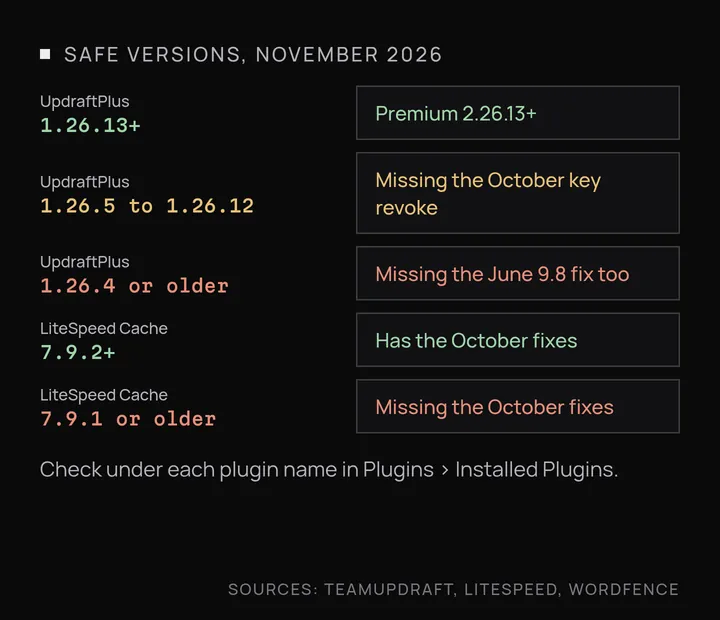
The current free version on WordPress.org is 1.26.14, released on 26 October 2026. Two separate issues decide the safe version.
The first is CVE-2026-10795, fixed in 1.26.5 in June 2026. Wordfence rates it 9.8 out of 10. In versions up to 1.26.4, an attacker with no login could forge UpdraftCentral commands and run them as the connected administrator, for example to install a plugin of their choosing. It only affects sites that have been connected to UpdraftCentral, but a connection made years ago and then forgotten still counts.
The second is the October key theft, which 1.26.13 deals with. Over the weekend of 17 and 18 October, someone got into teamupdraft.com, and TeamUpdraft believes UpdraftCentral connection keys were among the data accessed. Versions 1.26.13 (free) and 2.26.13 (Premium), released on 19 October, revoke the old keys. TeamUpdraft says attackers used those keys to create admin accounts and install malicious plugins on some connected sites. We covered that in more detail in the UpdraftPlus hack: what to check.
That makes 1.26.5 too old now. You want 1.26.13 or later, or 2.26.13 or later on Premium.
Updating doesn't undo anything that was already done to a site. If yours was ever connected to UpdraftCentral Cloud, TeamUpdraft asks you to:
- delete any remaining keys under Settings > UpdraftPlus > Advanced Tools > UpdraftCentral
- look for plugins and admin or editor accounts you don't recognise
- check
wp-content/pluginsandwp-content/mu-pluginsover SFTP or your host's file manager, because some of the malicious plugins hide from the Plugins screen
LiteSpeed Cache: get to 7.9.2 or later
The current version is 7.9.3, released on 3 November 2026. Version 7.9.2, from 20 October, fixed three issues:
- CVE-2026-113499 and CVE-2026-113500 are stored cross-site scripting, rated 7.2 by Wordfence. Someone with no account could get a script to run in visitors' browsers. LiteSpeed says this needs a published comment from a visitor, a theme that prints the commenter's name without escaping it, and certain CDN or font settings switched on.
- CVE-2026-113501 is a missing permission check that lets any logged-in user, down to Subscriber, dismiss the plugin's admin notices.
Wordfence also lists two further issues affecting 7.9.1 and older, both marked as patched. A site on 7.8.1 or 5.2 is several releases behind and misses all of these fixes. There's more on the October release in our LiteSpeed Cache 7.9.2 check.
If you can't update straight away, LiteSpeed's advice is to turn on comment moderation, which blocks the two scripting bugs.
How to check yours in 2 minutes
- Log in to WordPress and go to Plugins > Installed Plugins.
- Find UpdraftPlus and LiteSpeed Cache, and read the version under each name.
- Compare: UpdraftPlus needs 1.26.13 or later (2.26.13 for Premium), and LiteSpeed Cache needs 7.9.2 or later.
- If either is older, take a backup and click Update.
- If UpdraftPlus was ever linked to UpdraftCentral, work through TeamUpdraft's checks above as well.
Premium copies of UpdraftPlus only update with an active licence, so an expired licence is a common reason a site falls behind.
Want a hand?
If you'd like someone to look over your plugins, or the checks turned up something you're not sure about, have a chat with us or run a free scan.
Further reading
- Is your vet website still on Universal Analytics or an old cache plugin?
- Chrome says your WordPress sitemap uses XSLT. Your SEO is fine.
- Gravity Forms 3.1.2 flaw (CVE-2026-103039): how to check your site and fix it
- WordPress plugin closed on wordpress.org? What to do now
- Free website malware checks compared: CrawlCare, Sucuri SiteCheck, VirusTotal
- WordPress 7.1.4: what it means for your site
- Prime Mover CVE-2026-115806: check your version
- Duplicator CVE-2026-82814: are you affected?
- Google says "This site may be hacked": what it means and how to clear it
- LiteSpeed Cache 7.9.2: check for CVE-2026-113499 and friends
- Is my PHP version end of life? How to upgrade WordPress
- PHP2Shell: what PHP's emergency release means for your site
- Core Web Vitals assessment failed: what it means and how to pass
- UpdraftCentral hack: is your WordPress site affected?
- Rank Math PRO 3.0.123, Backuply and Everest Backup: is your site affected?
- AIOSEO and Bricksforge security updates: is your site affected?
- Why is my website slow?
- How to fix Core Web Vitals
- Why isn't my site showing on Google?
- How to check your website SEO for free: a 10-minute checklist
- Is your site slow because of the code or the distance? Hosting for South African sites
- Is my WordPress site hacked? A step-by-step check
- How to remove malware from a WordPress site (step by step)
- The UpdraftPlus hack: what to check on your WordPress site now
- php2shell: CISA says the PHP flaws are being exploited. Three checks for your site
- WP Project Manager CVE-2026-116512: a public exploit is out, here's what to check
- How to check if your WordPress site is still getting security updates