Your old Universal Analytics tag is collecting nothing
Published 4 Nov 2026
If your practice website was set up more than a few years ago, there's a fair chance it still loads a Google Analytics tag that starts with "UA-". That tag hasn't recorded a visit since 2023.
What our scans turned up
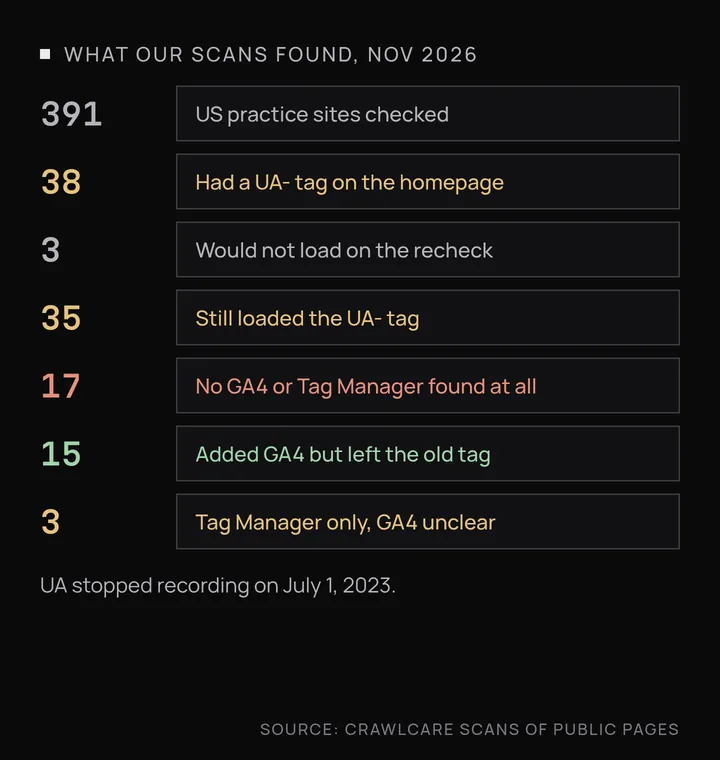
Over the past few weeks we looked at 391 US websites that came up in searches for vets, physical therapists, chiropractors and dentists. We only read public pages. 38 had a UA- tag in their homepage code.
When we went back to those 38 recently, 3 wouldn't load properly for us (the server refused or stalled the request), so we can't say what they run now. The other 35 all still loaded the UA- tag. On 17 of them we found no GA4 tag (a "G-" ID) and no Google Tag Manager container at all, so as far as we could see from the page code, nobody at those practices is getting any visitor numbers from Google. 15 had added GA4 but left the old tag in place, which does no real harm beyond loading dead code on every page. The last 3 had a Tag Manager container but no GA4 ID in the page, so GA4 may or may not be set up inside the container; we couldn't tell from outside.
What happened to Universal Analytics
Google's help page sets out the dates. Standard Universal Analytics properties stopped processing new data starting July 1, 2023. Paid Analytics 360 properties with a current order got a one-time extension that ended July 1, 2024. Starting the week of July 1, 2024, Google removed access to all Universal Analytics properties, including the API, and deleted the data. Anything nobody exported before then is gone, and Google says it can't be recovered.
A UA- tag on your site now sends hits that land nowhere. If your web designer or marketing agency still mentions "your Google Analytics," it's worth asking which kind.
Four checks you can do yourself
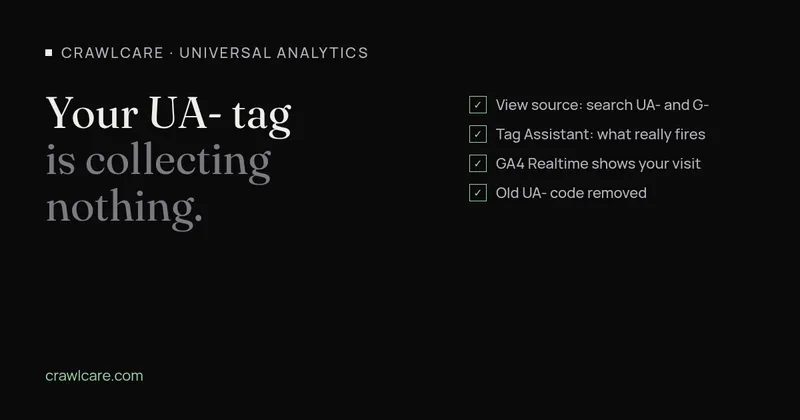
- Open your homepage in Chrome, right-click and pick View page source, then press Ctrl+F (Cmd+F on a Mac). Search for
UA-and then forG-. A UA- ID with no G- ID usually means you have no working Google Analytics. If you findGTM-instead, your tags live in Google Tag Manager, and you'll need to check the container itself. - Go to tagassistant.google.com, enter your site address and connect. It lists the Google tags that actually fire as you click around, which catches tags that only load on some pages.
- In your GA4 property, open Reports, then Realtime, and load your site on your phone. You should show up within a minute or so. If the report stays empty, the G- tag isn't installed where you think it is.
- On WordPress, UA tags often sit in an old analytics plugin, a header-and-footer scripts plugin, or a field in the theme's settings. Remove the UA- code there rather than leaving it to run alongside GA4.
Moving to GA4
If you don't have a GA4 property yet, create one in Google Analytics under Admin, then add a web data stream for your site. That gives you a measurement ID starting with G-. Install it in one place only. On WordPress that's usually Google's Site Kit plugin or your theme's header settings, and if you use Tag Manager, add a Google tag there instead. Then delete the old UA- code, and confirm with Tag Assistant and the Realtime report that GA4 is recording visits.
GA4 starts from zero. Your Universal Analytics history won't carry over, so the sooner it's in, the sooner you have numbers to compare against.
Patient data and analytics
Google's own HIPAA page says Google makes no representations that Google Analytics satisfies HIPAA requirements and doesn't offer Business Associate Agreements for it. Google tells HIPAA-regulated customers not to send it anything that could be protected health information. It also says not to put Analytics tags on authenticated pages, such as patient portals, and to be careful with public pages that relate to providing care.
The HHS Office for Civil Rights has a bulletin on online tracking technologies. It says a tracking tool on a page where someone books an appointment or uses a symptom checker can pick up protected health information, such as the person's email address or the reason they're seeking care. In June 2024 a federal court in Texas vacated one part of that guidance. That part covered tracking that only links an IP address with a visit to a public page about a health condition or provider. The rest of the bulletin still stands, and HHS says it's evaluating next steps.
In practice, that means keeping analytics off your patient portal, booking forms and intake forms, and talking to whoever handles your HIPAA compliance before you add tracking to pages about specific treatments. Vet practices should follow the same habit for client details. Google Analytics policies ban sending Google anything it could recognize as personally identifiable information, so names, email addresses and phone numbers should stay out of URLs and form tracking.
We wrote a separate piece on vet websites with old Universal Analytics tags and out-of-date cache plugins, which covers a set of UK practices and two other problems we found alongside UA.
Want us to look?
If you'd like someone to check which tags your site loads and help move it over to GA4, have a chat with us or run a free scan.
Further reading
- Is your vet website still on Universal Analytics or an old cache plugin?
- Chrome says your WordPress sitemap uses XSLT. Your SEO is fine.
- Gravity Forms 3.1.2 flaw (CVE-2026-103039): how to check your site and fix it
- WordPress plugin closed on wordpress.org? What to do now
- Free website malware checks compared: CrawlCare, Sucuri SiteCheck, VirusTotal
- WordPress 7.1.4: what it means for your site
- Prime Mover CVE-2026-115806: check your version
- Duplicator CVE-2026-82814: are you affected?
- Google says "This site may be hacked": what it means and how to clear it
- LiteSpeed Cache 7.9.2: check for CVE-2026-113499 and friends
- Is my PHP version end of life? How to upgrade WordPress
- PHP2Shell: what PHP's emergency release means for your site
- Core Web Vitals assessment failed: what it means and how to pass
- UpdraftCentral hack: is your WordPress site affected?
- Rank Math PRO 3.0.123, Backuply and Everest Backup: is your site affected?
- AIOSEO and Bricksforge security updates: is your site affected?
- Why is my website slow?
- How to fix Core Web Vitals
- Why isn't my site showing on Google?
- How to check your website SEO for free: a 10-minute checklist
- Is your site slow because of the code or the distance? Hosting for South African sites
- Is my WordPress site hacked? A step-by-step check
- How to remove malware from a WordPress site (step by step)
- The UpdraftPlus hack: what to check on your WordPress site now
- php2shell: CISA says the PHP flaws are being exploited. Three checks for your site
- WP Project Manager CVE-2026-116512: a public exploit is out, here's what to check
- How to check if your WordPress site is still getting security updates
- UpdraftPlus and LiteSpeed Cache: which versions are safe in Nov 2026, and how to check yours in 2 minutes